aimeos/ai-cms-grapesjs
最新稳定版本:2025.10.3
Composer 安装命令:
composer require aimeos/ai-cms-grapesjs
包简介
Aimeos GrapesJS CMS extension
README 文档
README
Aimeos GrapesJS CMS
The Aimeos GrapesJS CMS extension provides a simple to use but powerful page editor for creating content pages based on extensible components.
Installation
As every Aimeos extension, the easiest way is to install it via composer. If you don't have composer installed yet, you can execute this string on the command line to download it:
php -r "readfile('https://getcomposer.org/installer');" | php -- --filename=composer
To add the extionsion to your composer-based installation, execute:
composer req "aimeos/ai-cms-grapesjs"
These command will install the Aimeos extension into the extension directory and it will be available after you execute the database migration:
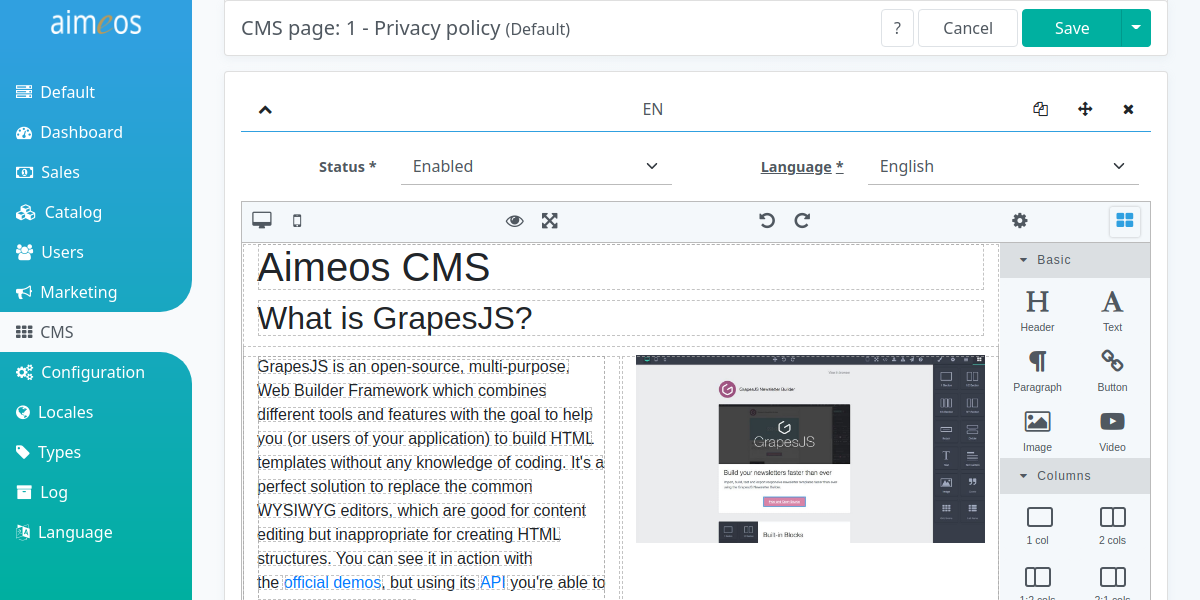
Integration
Laravel
First, you have to create the new tables required for the pages by executing this command in the root directory of your Laravel application:
php artisan aimeos:setup
Then, you need to uncomment the page section in your config/shop.php and add cms/page to the list of components if it's not already there. Add cms/page to all pages where you want to display CMS content, e.g.:
'catalog-home' => [ 'cms/page','locale/select','basket/mini','catalog/tree','catalog/search','catalog/home' ],
To show the content for the CMS page URLs, you have to add this at the end of the ./routes/web.php file in your Laravel application:
Route::match(['GET', 'POST'], '{path?}', '\Aimeos\Shop\Controller\PageController@indexAction')
    ->name('aimeos_page')->where( 'path', '.*' );
In multi-language setups, you should add the locale as parameter to the route:
Route::match(['GET', 'POST'], '{locale}/{path?}', '\Aimeos\Shop\Controller\PageController@indexAction')
    ->name('aimeos_page')->where( 'path', '.*' );
When using a multi-vendor setup, then use one of these alternatives:
// prefix: yourdomain.com/vendor1
Route::group(['prefix' => '{site}', 'middleware' => ['web']], function () {
    Route::match(['GET', 'POST'], '{path?}', '\Aimeos\Shop\Controller\PageController@indexAction')
        ->name('aimeos_page')->where( 'path', '.*' )->where( ['site' => '[a-z0-9\-]+'] );
});

// subdomain: vendor1.yourdomain.com
Route::group(['domain' => '{site}.yourdomain.com', 'middleware' => ['web']], function () {
    Route::match(['GET', 'POST'], '{path?}', '\Aimeos\Shop\Controller\PageController@indexAction')
        ->name('aimeos_page')->where( 'path', '.*' )->where( ['site' => '[a-z0-9\-]+'] );
});

// custom domain: vendor1.com
Route::group(['domain' => '{site}', 'middleware' => ['web']], function () {
    Route::match(['GET', 'POST'], '{path?}', '\Aimeos\Shop\Controller\PageController@indexAction')
        ->name('aimeos_page')->where( 'path', '.*' )->where( ['site' => '[a-z0-9\.\-]+'] );
});
This will add a "catch all" route for every URL that hasn't been matched before so don't put routes after that line because they won't be used any more!
ReCAPTCHA integration
Use use Google reCAPTCHA v3 (invisible CAPTCHA) for all forms in CMS pages, you need to merge this configuration into your ./config/shop.php (Laravel):
[
    'resource' => [
        'recaptcha' => [
            'secretkey' => '...',
            'sitekey' => '...'
        ]
    ],
    'client' => [
        'html' => [
            'cms' => [
                'page' => [
                    'decorators' => [
                        'local' => [
                            'Recaptcha' => 'Recaptcha'
                        ]
                    ],
                ]
            ]
        ]
    ]
]
The secretkey and sitekey are generated in your Google account. Make sure, you also add all your domains to the list of allowed domains!
Potential problems
Page with contact form expired
Due to potential security risks, you must not be logged into the admin backend when using the contact form. Otherwise, you will get a "419 page expired" error page. Thus, make sure you are logged out of the admin backend before sending a contact request.
统计信息
- 总下载量: 101.52k
- 月度下载量: 0
- 日度下载量: 0
- 收藏数: 874
- 点击次数: 4
- 依赖项目数: 2
- 推荐数: 0
其他信息
- 授权协议: LGPL-3.0
- 更新时间: 未知