briceburg/silverstripe-flexiaddress
最新稳定版本:0.2.0
Composer 安装命令:
composer require briceburg/silverstripe-flexiaddress
包简介
Add microdata friendly addresses and phone numbers to your SilverStripe objects.
README 文档
README
Add microdata friendly addresses and phone numbers to your SilverStripe objects.
Features
- schema.org microdata templating
- extend any DataObject
- reduces administrative repetitiveness and improves consistency through many_many relationships
- extensible through YAML Configuration and subclassing
Requirements
The venerable GridFieldExtensions https://github.com/ajshort/silverstripe-gridfieldextensions
Tested in SilverStripe 3.1
Screenshots
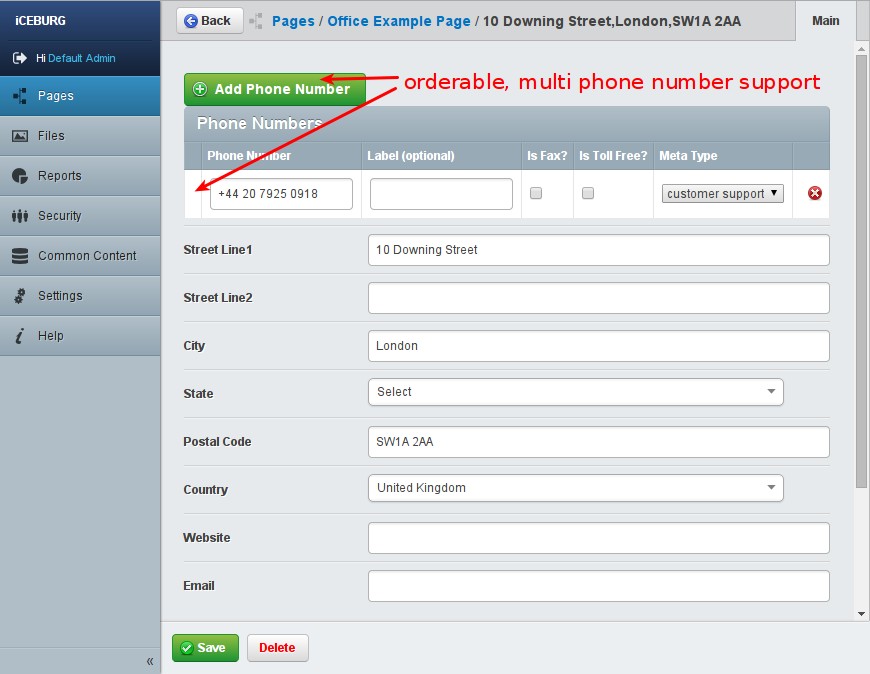
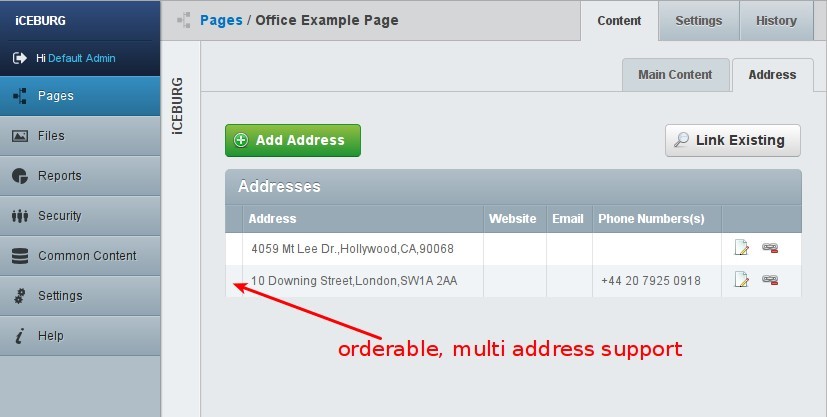
Usage
- Add address and phone numbers to your Objects by extending them with
FlexiAddressExtension.
class Office extends Page
{

    private static $extensions = array(
        'FlexiAddressExtension'
    );

}
- Trigger the environment builder (/dev/build) after extending your objects -- You will now see the Address tab when editing Office in the CMS.
Front-end
FlexiAddress provides a shortcut to return the first address associated. Here's an example Office.ss
```html
<div itemscope itemtype="http://schema.org/LocalBusiness" id="office">
  <h1>$Title</h1>

  ...

  $FlexiAddress

  <div class="office-phone-numbers">
    <% loop FlexiAddress.PhoneNumbers %>
      <% include FlexiAddressPhone %>
    <% end_loop %>
  </div>

  ...

</div>
You can also loop through addresses. Here's an example Office.ss
<div itemscope itemtype="http://schema.org/LocalBusiness" id="office">

  <h1>$Title</h1>

  ...

  <% loop FlexiAddresses %>

    <h2>Address</h2>
    <% include FlexiAddress %>

    <a href="$AddressMapLink" target="_blank" class="directions font-opensans">
      Get Directions
    </a>

    <% loop PhoneNumbers %>
      <% include FlexiAddressPhone %>
    <% end_loop %>
  <% end_loop %>

  ...

</div>
You may, as always, override the built-in templates by adding them to your theme and changing markup as needed.
Limiting Fields
You may find the built-in address fields a bit too much. Here's a few strategies to limit them;
- Strategy 1: Globally via mysite/config/config.yml
---

FlexiAddressExtension:
  flexiaddress_fields:
    - StreetLine1
    - City
    - PhoneNumbers
- Strategy 2: Via the $flexiaddress_fields property on extended classes
class Office extends Page
{

    protected static $flexiaddress_fields = array(
        'StreetLine1',
        'City',
        'PhoneNumbers'
    );
}
- Strategy 3: Via YAML Configuration of extended classes
---

Office:
  flexiaddress_fields:
    - StreetLine1
    - City
    - PhoneNumbers
Changing the Address Tab Name
By default, flexiaddress adds its GridField to the Root.Address tab. You can configure this in a couple of ways;
- Strategy 1: Via YAML Configuration
---

# Global Change
FlexiAddressExtension:
  flexiaddress_tab: Root.Addresses

# Class Specific
Office:
  flexiaddress_tab: Root.Main
  flexiaddress_insertBefore: Content
- Strategy 2: Through your extended class
class Office extends Page
{

    // Option 1 - properties
    ////////////////////////

    protected static $flexiaddress_tab = 'Root.Main';
    protected static $flexiaddress_insertBefore = 'Content';

    // Option 2 - via Config::inst()->update
    ////////////////////////////////////////

    public function getCMSFields()
    {
        $this->set_stat('flexiaddress_tab', 'Root.Addresses');
        return parent::getCMSFields();
    }

}
Changing the Add New GridField Button
If you don't like "Create New Address", follow the Changing the Address Tab Name procecedure, but alter the flexiaddress_addButton propperty.
统计信息
- 总下载量: 40
- 月度下载量: 0
- 日度下载量: 0
- 收藏数: 3
- 点击次数: 5
- 依赖项目数: 0
- 推荐数: 1
其他信息
- 授权协议: BSD-3-Clause
- 更新时间: 2014-11-29