bruli/php-git-hooks
最新稳定版本:v5.9
Composer 安装命令:
composer require bruli/php-git-hooks
包简介
Git hooks for PHP projects.
README 文档
README
Git hooks for PHP projects.
Library based in git hook scripts for PHP projects.
Installation
Step 1: Composer
You must add the following line to the composer.json file to use with Symfony 3.0:
{ "require-dev": { "bruli/php-git-hooks": "~4.1" } } You can use "~2.0" for Symfony version 2.X.
Or you can write in your console:
$ composer require bruli/php-git-hooks --dev
If you don't have composer, you need download the binary file and run it:
$ wget http://getcomposer.org/composer.phar # or $ curl -O http://getcomposer.org/composer.phar $ php composer.phar install Step 2: Configuration
Using Composer
First, you will need to add the following lines to your composer.json
"scripts": { "post-install-cmd": [ "PhpGitHooks\\Infrastructure\\Composer\\ConfiguratorScript::buildConfig" ], "post-update-cmd": [ "PhpGitHooks\\Infrastructure\\Composer\\ConfiguratorScript::buildConfig" ] }
WARNING: "PhpGitHooks\Application\Composer\ConfiguratorScript::buildConfig" is deprecated. You need change by current entry.
Then, launch $ composer install and composer should ask you about configuration

Bin directory configuration.
If your project doesn't have a "bin/" directory, you can add this in your composer.json file.
"config": { "bin-dir": "bin" }
Note: This is not necessary for Symfony projects.
Manual config file for git hooks.
You can configure php-git-hooks, creating a php-git-hooks.yml file with...
pre-commit: enabled: true execute: php-cs-fixer: enabled: true levels: psr0: true psr1: true psr2: true symfony: true options: "--fixers=short_array_syntax --diff" phpunit: enabled: true random-mode: true options: '<some options>' strict-coverage: enabled: true minimum: 90 guard-coverage: enabled: true message: 'WARNING!!, your code coverage is lower.' phplint: true phpcs: enabled: true standard: PSR2 phpmd: enabled: true options: '<some options>' composer: true message: right-message: 'HEY, GOOD JOB!!' error-message: 'FIX YOUR CODE!!' commit-msg: enabled: true regular-expression: '#[0-9]{2,7}' pre-push: enabled: true execute: phpunit: enabled: true random-mode: true options: '<some options>' strict-coverage: enabled: true minimum: 90 guard-coverage: enabled: true message: 'WARNING!!, your code coverage is lower.' message: right-message: 'PUSH IT!!' error-message: 'YOU CAN NOT PUSH CODE!!'
... or you can copy php-git-hooks.yml.sample from vendor/bruli/php-git-hooks.
Config file for phpunit.
If you want use phpunit tool, you must create a phpunit.xml.dist in your project root directory. Alternatively you can copy from vendor/bruli/php-git-hooks/phpunit.xml.dist in your project root directory.
Config file for phpmd.
The same case that phpunit. You must create a PmdRules.xml in your project root directory or copy from php-git-hook directory.
Step 3: Enabling hooks.
The most easy way to enable hook is copy hook file into your .git/hooks directory.
For pre-commit hook:
You can enable this hooks with composer or manually executing
$ cp vendor/bruli/php-git-hooks/src/PhpGitHooks/Infrastructure/Hook/pre-commit .git/hooks
For commit-msg hook:
$ cp vendor/bruli/php-git-hooks/src/PhpGitHooks/Infrastructure/Hook/commit-msg .git/hooks
For pre-push hook:
$ cp vendor/bruli/php-git-hooks/src/PhpGitHooks/Infrastructure/Hook/pre-push .git/hooks
execute.
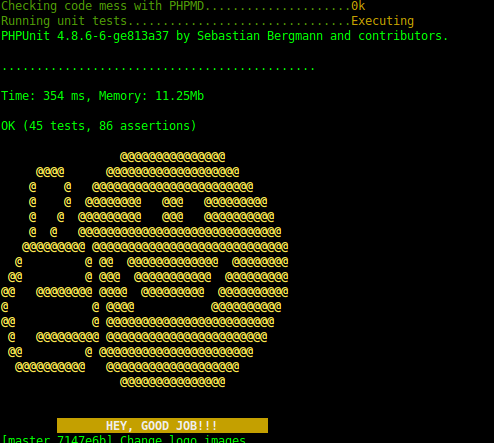
Valid pre-commit.
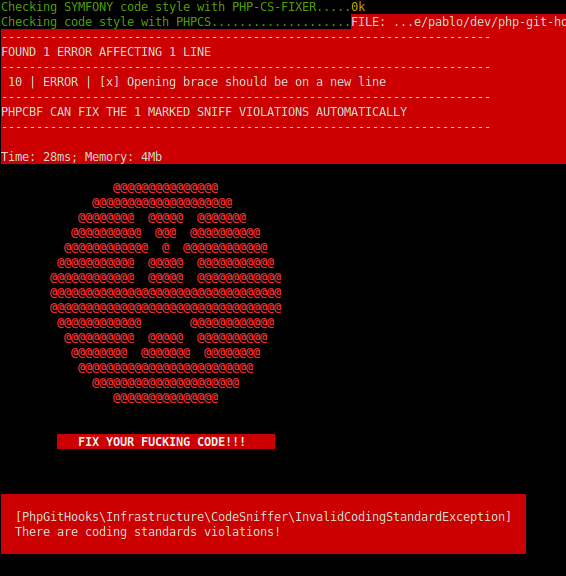
Fail pre-commit.
Credits
- Pablo Braulio (@brulics)
- All contributors
License
php-git-hooks is released under the MIT License. See the bundled LICENSE file for details.
统计信息
- 总下载量: 369.56k
- 月度下载量: 0
- 日度下载量: 0
- 收藏数: 676
- 点击次数: 6
- 依赖项目数: 6
- 推荐数: 0
其他信息
- 授权协议: MIT
- 更新时间: 2026-01-04