by-strange/datetime-picker
最新稳定版本:0.1.6
Composer 安装命令:
composer require by-strange/datetime-picker
包简介
Date and time picker for Yii Framework.
README 文档
README
Tempus Dominus Date/Time Picker.


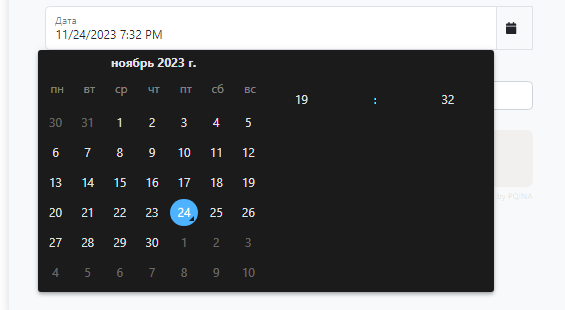
Installation
The preferred way to install this extension is through composer.
Either run
composer require --dev --prefer-dist yii2-extensions/datetime-picker:^0.1
or add
"yii2-extensions/datetime-picker": "^0.1"
to the require section of your composer.json file.
Usage
Name
use Yii2\Extensions\DateTimePicker\DateTimePicker;

echo DateTimePicker::widget(['name' => 'datetime-picker']);
Active Field
use Yii2\Extensions\DateTimePicker\DateTimePicker;

echo $form
    ->field($formModel, 'date')
    ->widget(
        DateTimePicker::class,
        [
            'icon' => Icon::renderIcon('solid', 'calendar', ['class' => 'me-2 fa-solid'])
        ]
    );
Active Field Floating Label
use Yii2\Extensions\DateTimePicker\DateTimePicker;

echo $form
    ->field($formModel, 'date', ['options' => ['class' => 'mt-3']])
    ->label(false)
    ->widget(
        DateTimePicker::class,
        [
            'floatingLabel' => true,
            'icon' => Icon::renderIcon('solid', 'calendar', ['class' => 'me-2 fa-solid'])
        ]
    )
Dynamic Theme Configuration for tempusDominus Widget Library
This library provides functionality to dynamically configure the tempusDominus widget's theme based on user preferences or predefined settings.
Functionality Overview
The library introduces a feature to automatically set up the tempusDominus widget with a theme determined by the user's preference or specified configurations.
Automatic Theme Configuration
Upon initialization, the library checks for theme configuration settings. If the user has specified a theme in the library's configuration, it takes precedence.
Browser-Based Theme Detection
If no specific theme is set or the attribute data-bs-theme is absent:
The library uses the prefers-color-scheme media query to detect the user's system preference for light or dark mode.
Applying Theme Configuration to tempusDominus Widget
The library sets the theme configuration (theme: 'dark' or theme: 'light') based on the detected or specified theme.
This configuration is then applied to the tempusDominus widget using the library's internal functionalities.
Properties of the widget
| Property | Type | Description | Default |
|---|---|---|---|
config |
array |
The configuration of the widget. | [] |
containerClass |
string |
The class of the container. | input-group |
cdn |
boolean |
Whether to use the CDN. | true |
floatingLabel |
boolean |
Whether to use the floating label. | false |
format |
string |
The format of the date. | yyyy/MM/dd HH:mm:ss |
formatMonth |
string |
The format of the month. | long |
formatYear |
string |
The format of the year. | numeric |
icon |
string |
The icon of the widget. | '' |
id |
string |
The ID of the widget. | datetimepicker1 |
labelClass |
string |
The class of the label. | form-label |
labelContent |
string |
The content of the label. | '' |
spanClass |
string |
The class of the span. | input-group-text |
startOfTheWeek |
integer |
The start of the week. | 1 |
template |
string |
The template of the widget. '{label}\n{input}\n{span}' |
Translation support
The extension supports translation. You can translate the extension into your language, for default the extension supports the following languages.
- Chinese
- English
- French
- German
- Portuguese
- Russian
- Spanish
Quality code

Support versions Yii2
Testing
Check the documentation testing to learn about testing.
Our social networks
License
The MIT License. Please see License File for more information.
统计信息
- 总下载量: 12
- 月度下载量: 0
- 日度下载量: 0
- 收藏数: 1
- 点击次数: 3
- 依赖项目数: 0
- 推荐数: 0
其他信息
- 授权协议: mit
- 更新时间: 2024-08-15