chiiya/nova-leaflet-field
最新稳定版本:1.7.0
Composer 安装命令:
composer require chiiya/nova-leaflet-field
包简介
Leaflet map field for Laravel Nova
关键字:
README 文档
README
Nova Leaflet Field
🗺️ Leaflet map field with geo-coding search for Laravel Nova
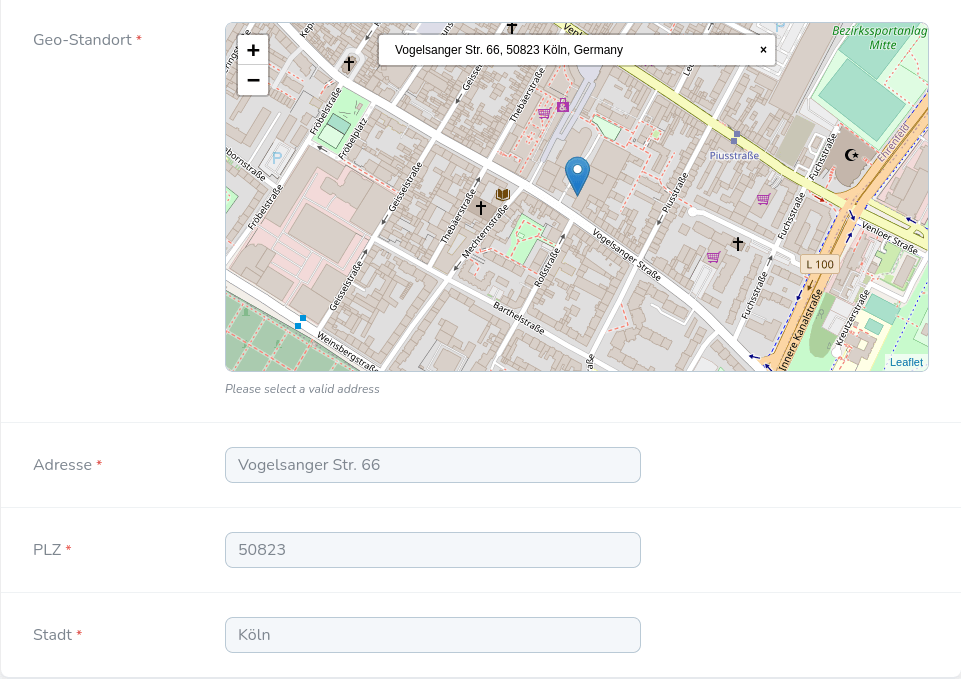
Index
> Installation .....................................................................
> Usage ............................................................................
Installation
composer require chiiya/nova-leaflet-field
# Publish marker icon assets
php artisan vendor:publish --provider="Chiiya\NovaLeafletField\FieldServiceProvider"
Usage
To use the leaflet field, simply specify a label name:
LeafletField::make(__('Geo-Location'))
The field will only be displayed on detail and form views. It will attempt to look for latitude and longitude fields on the associated model to set the initial marker on the map, but you may customize this if your field names are different:
LeafletField::make(__('Geo-Location'))
    ->latitudeField('lat')
    ->longitudeField('lng')
The default tile and search provider for Leaflet is OpenStreetMaps. You may configure any search provider supported by leaflet-geosearch:
LeafletField::make(__('Geo-Location'))
    ->searchProvider(SearchProvider::GOOGLE)
    ->searchProviderKey('api-key')
    ->searchProviderOptions(['language' => 'de', 'region' => 'de'])
For customizing the tiles, provide a tile URL:
LeafletField::make(__('Geo-Location'))
    ->tileUrl('https://{s}.tile.osm.org/{z}/{x}/{y}.png')
There are a number of options to customize the map behaviour:
LeafletField::make(__('Geo-Location'))
    // Make the map marker draggable
    ->draggable()
    // Customize the geo-search search label
    ->searchLabel(__('Enter address'))
    // Default map zoom
    ->zoom(12)
    // Customize default latitude & longitude
    ->defaultCoordinates(0.0, 0.0)
Validation
When marking the field as required, the field will additionally validate that coordinates other than the default ones have been selected. If you wish to disable this behaviour, call the following method:
LeafletField::make(__('Geo-Location'))
    ->allowDefaultCoordinates()
You may also customize the error message shown when default coordinates were selected:
LeafletField::make(__('Geo-Location'))
    ->errorMessage(__('Please select a valid location'))
Address Fields Population
When using the Google search provider, you may use the data from the selected location to populate other fields on your model:
LeafletField::make(__('Geo-Location'))
    ->searchProvider(SearchProvider::GOOGLE)
    ->searchProviderKey('api-key')
    ->populateAddress()
    ->populatePostalCode('zip')
    ->populateCity()
    ->populateCountry()
The field will attempt to look for other inputs on the page with the default (address, postal_code, city, country) or custom names, and fill them with the values received from the Google Geocoding API. For the address, you may specify a custom format:
LeafletField::make(__('Geo-Location'))
    ->searchProvider(SearchProvider::GOOGLE)
    ->searchProviderKey('api-key')
    ->populateAddress()
    // Defaults to '{street_name} {street_number}'
    ->populatedAddressFormat('{street_number}, {street_name}')
This will only work when using the Google search provider.
统计信息
- 总下载量: 994
- 月度下载量: 0
- 日度下载量: 0
- 收藏数: 2
- 点击次数: 5
- 依赖项目数: 0
- 推荐数: 0
其他信息
- 授权协议: MIT
- 更新时间: 2021-07-22