holyshared/file-fixture
最新稳定版本:2.0.2
Composer 安装命令:
composer require holyshared/file-fixture
包简介
Simple file fixture loader for unittest
README 文档
README
Simple file fixture loader for unittest.
You can easily load the test-based fixture.
Table of contents
Basic usage
Will be able to load the fixture in four steps.
- Create a loader of container
- Create a fixture of container
- Create a FileFixture
- Load fixture from the container.
$loaders = new LoaderContainer([
    new TextLoader()
]);

$fixtures = new FixtureContainer([
    'text:default:readme' => __DIR__ . '/README.md'
]);

$fixture = new FileFixture($fixtures, $loaders);
$content = $fixture->load('text:default:readme');

print $content;
Loader is compatible with text data, mustache template, ASCII art.
- TextLoader - Load the text data.
- MustacheLoader - Load the mustache template
- ArtLoader - Load the ASCII art.
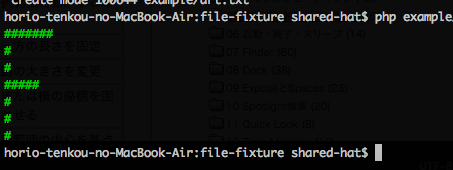
Output fixture of terminal
With ArtLoader, you can load the coloring text data.
Create a fixture file
Create a fixture file.
Mark the text to apply the color in the tag.
<green>#######</green>
<green>#</green>
<green>#</green>
<green>#####</green>
<green>#</green>
<green>#</green>
<green>#</green>
Load of Output fixture
$loaders = new LoaderContainer([
    new ArtLoader(new MustacheLoader(new TextLoader()))
]);

$fixtures = new FixtureContainer([
    'art:default:header' => __DIR__ . '/art.txt'
]);

$fixture = new FileFixture($fixtures, $loaders);
$content = $fixture->load('art:default:header');

print $content;
Configuration file
Using the configuration file, you will be able to easily load the fixture.
Example of the fixture to load the mustache of template.
Create a fixture template
{{name}} task was successful.
Create a configuration file of fixture
The name of the fixture, you must begin with the name of the loader.
[mustache.default]
successMessage = "template.ms"
The name of this fixture will be mustache:default:successMessage.
Load of fixture
Load the fixture by specifying the name.
When the load is successful, will return the results of template of mustache has been processed.
$textLoader = new TextLoader();
$loaders = new LoaderContainer([
    $textLoader,
    new MustacheLoader($textLoader)
]);

$factory = new FixtureContainerFactory();
$fixtures = $factory->createFromFile(__DIR__ . '/fixtures.toml');

$fixture = new FileFixture($fixtures, $loaders);
$content = $fixture->load('mustache:default:successMessage', [
    'name' => 'build'
]);

print $content;
Contributors
- Jérémy Marodon (@Th3Mouk)
统计信息
- 总下载量: 1.37k
- 月度下载量: 0
- 日度下载量: 0
- 收藏数: 0
- 点击次数: 4
- 依赖项目数: 2
- 推荐数: 0
其他信息
- 授权协议: MIT
- 更新时间: 2015-04-15