inspiredminds/contao-fieldset-duplication
最新稳定版本:2.3.4
Composer 安装命令:
composer require inspiredminds/contao-fieldset-duplication
包简介
Contao extension to allow the duplication of form fieldsets in the front end by the user for additional input fields.
README 文档
README
Contao Fieldset Duplication
Contao extension to allow the duplication of form fieldsets in the front end by the user for additional input fields.
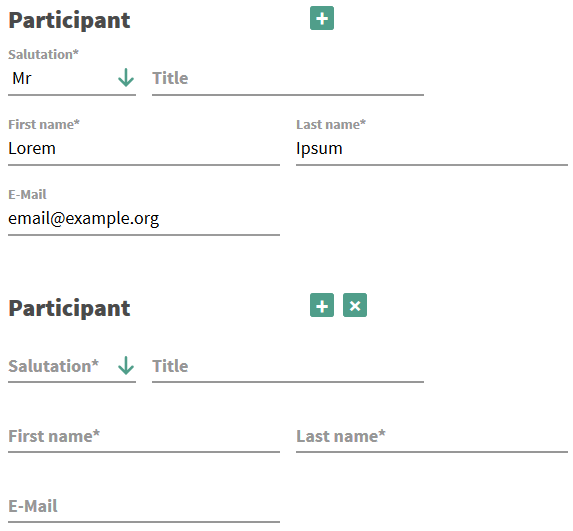
You need to enable the js_fieldset_duplication template in your page layout.
The following options can be changed:
<?= Contao\Template::generateScriptTag('bundles/contaofieldsetduplication/js.fieldset.duplication.min.js', false, null) ?> <script> document.addEventListener('DOMContentLoaded', function() { var elements = document.querySelectorAll('fieldset.allow-duplication'); elements.forEach(function(element) { fieldsetDuplication(element, { /* when true, prepends the button wrapper within the fieldset, instead of appending */ prepend: false, /* text content of the add button */ buttonAdd: '+', /* text content of the remove button */ buttonRemove: '×', /* a custom widget CSS selector */ widgetSelector: '.form-widget', // defaults to .widget }); }); }); </script>
If you want to store the additional data in your database table (using the form
generator's ability to store the data in the database), you need to add a column
called fieldset_duplicates to your target table. This column will then contain
the additionally submitted fields in a JSON encoded object.
Note
Version 2.1.0 introduced the js_fieldset_duplication template. There also exists a jQuery version
under the name j_fieldset_duplication from previous versions of this extension for BC purposes. Make sure to not
enable both these templates.
Notification tokens
If you need your fieldset rendered as notification tokens, you can define notification token formats. Just define the fieldset name, a format name and select a template. The fieldset will be available at token form_{NAME}_{FORMAT} ({NAME}_{FORMAT} if you don't use the notification center).
The following templates are shipped with this extension:
- nc_fieldset_duplication_text: Renders the fieldset data as
label: valuepairs - nc_fieldset_duplication_html: Renders the fieldset data as html table
- nc_fieldset_duplication_json: Renders the fieldset data as json string
统计信息
- 总下载量: 8.38k
- 月度下载量: 0
- 日度下载量: 0
- 收藏数: 15
- 点击次数: 10
- 依赖项目数: 2
- 推荐数: 0
其他信息
- 授权协议: LGPL-3.0-or-later
- 更新时间: 2018-12-16