itliusha/filament-pretty-json
Composer 安装命令:
composer require itliusha/filament-pretty-json
包简介
Read-only field to show pretty json in your filamentphp forms
README 文档
README
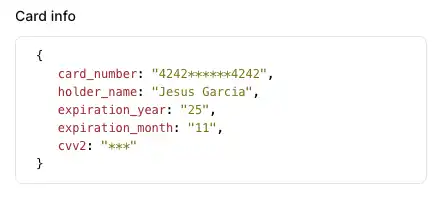
Read-only field to show pretty json in your filamentphp forms or infolists.
Installation
You can install the package via composer:
composer require itliusha/filament-pretty-json:dev-main
This package supports Filament 2.x, 3.x and 4.x.
Add to form
Simply use the component as you'd use any other Filament field. It's especially perfect for the resource view page where it blends right in.
use Novadaemon\FilamentPrettyJson\Form\PrettyJsonField;

class FormResource extends Resource
{
    public static function form(Form $form): Form
    {
        return $form
            ->schema([
                PrettyJsonField::make('json')
            ]);
    }
}
Add to infolist
Use PrettyJsonEntry class instead.
use Novadaemon\FilamentPrettyJson\Infolist\PrettyJsonEntry;

class InfoResource extends Resource
{
    public static function infolist(Infolist $infolist): Form
    {
        return $infolist
            ->schema([
                PrettyJsonEntry::make('json')
            ]);
    }
}
The value of the field can be casting to string, json, array, object, AsArrayObject or object that implements Jsonable interface
/**
 * @var string[]
 */
protected $casts = [
    'card_info' => 'string',
    // OR 'card_info' => 'json',
    // OR 'card_info' => 'array',
    // OR 'card_info' => 'object',
    // OR 'card_info' => AsArrayObject::class,
    // OR 'card_info' => CustomCast::class,
];
Allowing the value to be copied to the clipboard
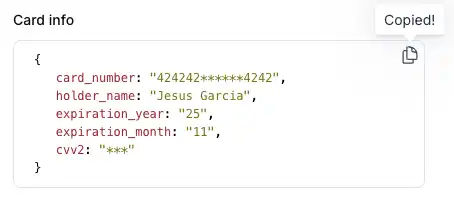
You may make the JSON copyable, such that clicking on the icon that appear in the top of the div when this option is enabled, the JSON value to the clipboard, and optionally specify a custom confirmation message and duration in milliseconds.
PrettyJsonEntry::make('card_info')
    ->copyable()
    ->copyMessage('Your JSON is copied to the clipboard')
    ->copyMessageDuration(1500)
Customize
Add extra attributes
You can add additional attributes to the pre div using the extraAttributes() method.
PrettyJsonField::make('card')
->extraAttributes([
  'style' => 'max-height: 200px;',
]),
Global customization
Optionally, you can publish the views using
php artisan vendor:publish --tag="filament-pretty-json-views"
Also, you can overwrite the css rules in your stylesheets.
.prettyjson-container {
  position: relative;
  min-width: 0;
  flex: 1;
}

pre.prettyjson {
  color: black;
  background-color: rgba(0, 0, 0, 0);
  border: 1px solid rgb(229, 231, 235);
  border-radius: 0.5rem;
  padding: 10px 20px;
  overflow: auto;
  font-size: 12px;
}

:is(.dark) pre.prettyjson {
  opacity: 0.7;
  --tw-bg-opacity: 1;
  --tw-border-opacity: 1;
  border: 1px solid rgb(75 85 99 / var(--tw-border-opacity));
  color: rgb(209 213 219 / var(--tw-text-opacity));
}

:is(.dark) pre.prettyjson span.json-key {
  color: red !important;
}

:is(.dark) pre.prettyjson span.json-string {
  color: aquamarine !important;
}

:is(.dark) pre.prettyjson span.json-value {
  color: deepskyblue !important;
}

.copy-button {
  position: absolute;
  right: 5px;
  top: 5px;
  width: 20px;
  height: 20px;
  text-align: center;
  line-height: 20px;
  cursor: pointer;
  color: rgb(156 163 175);
  border: none;
  outline: none;
  z-index: 50;
}

.copy-button:hover {
  color: rgb(75 85 99);
}

.copy-button:active,
.copy-button:focus {
  border: none;
  outline: none;
}
Contributing
Contributing is pretty chill and is highly appreciated! Just send a PR and/or create an issue!
Credits
License
The MIT License (MIT). Please see License File for more information.
统计信息
- 总下载量: 8
- 月度下载量: 0
- 日度下载量: 0
- 收藏数: 0
- 点击次数: 3
- 依赖项目数: 0
- 推荐数: 0
其他信息
- 授权协议: MIT
- 更新时间: 2025-11-25