itrocks/coding-standard
Composer 安装命令:
composer require itrocks/coding-standard
包简介
CodeSniffer ruleset for the it.rocks 0.2+ coding standard
README 文档
README
A coding standard to check against the it.rocks coding standards.
1. Installation
1.1 Composer
This standard can be installed with Composer dependency manager:
-
Install Composer
-
Install coding standard as a dependency of your project
composer require --dev itrocks/coding-standard
- Check the installed coding standards for "ITRocks"
vendor/bin/phpcs -i
Should display the ITRocks coding standard, between others
- If needed, add the coding standard to the PHP_CodeSniffer install path
vendor/bin/phpcs --config-set installed_paths `realpath vendor/itrocks/coding-standard/ITRocks`
- Done!
vendor/bin/phpcs --standard=ITRocks ./
1.2 Stand-alone
- Checkout this repository
git clone https://git.crafter.fr/itrocks/coding-standard
- Install dependencies
cd coding-standard
composer install
- Check the installed coding standards for "ITRocks"
vendor/bin/phpcs -i
- If needed, add the coding standard to the PHP_CodeSniffer install path
vendor/bin/phpcs --config-set installed_paths `realpath ITRocks`
- Usage
vendor/bin/phpcs --standard=ITRocks /home/vendor/project
You can check that this tools himself respect ITRocks standard
vendor/bin/phpcs --standard=ITRocks --extensions=php $CI_PROJECT_DIR/ITRocks
2. Run unit tests
From the command line
Simply run
vendor/bin/phpunit
From PHPStorm, with PHP installed locally
Right-click on "phpunit.xml.dist" and select "Run phpunit.xml.dist".
This works only for coding-standard being installed into a dependency of your project. If you want to run tests on a standalone mode, you have to change this file path into the phpunit.xml.dist file :
- for dependency : bootstrap="../../../vendor/squizlabs/php_codesniffer/tests/bootstrap.php"
- for standalone : bootstrap="vendor/squizlabs/php_codesniffer/tests/bootstrap.php"
3. PhpStorm integration
After having cloned this project on your disk, you're able to integrate coding standards rules directly in PhpStorm.
Go in PhpStorm settings Languages & Framework > PHP > Code Sniffer to configure the path of phpcs executable:

Click on Apply button.
Now, go to: Editor > Inspections > PHP > PHP Code Sniffer validation, check the checkbox and configure as following:

That's it!
To inspect a file/directory, just right click on it in the project windows, select "Inspect Code...", then OK.
4. PhpStorm AutoFix
- Go to Settings -> Tools -> External tools
- Configure the following
- Name : Apply Coding Standards
- Program :
/home/vendor/project/vendor/bin/phpcbf(Use the path to your project) - Arguments :
-vvv --standard=ITRocks --extensions=php,fixed.inc $FilePath$ - Project directory :
$ProjectFileDir$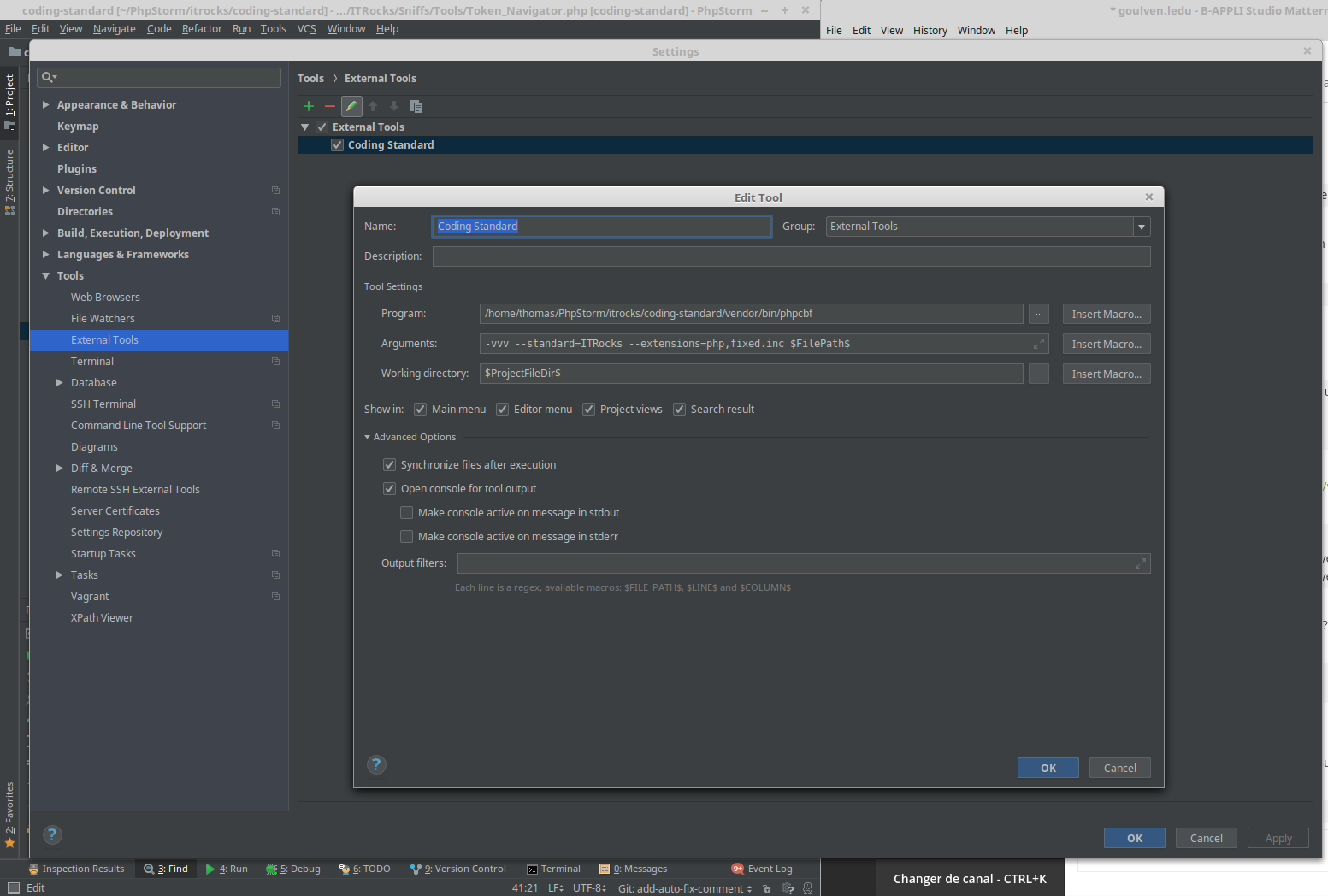

- Go to Settings -> Keymap -> External Tools -> Coding Standard
- Right click -> Add Keyboard Shortcut
- Add : Ctrl+<
Now you can auto-fix your php files using the Ctrl+< keyboard combination, or the menu Tools -> External Tools -> Apply Coding Standards
统计信息
- 总下载量: 9
- 月度下载量: 0
- 日度下载量: 0
- 收藏数: 0
- 点击次数: 3
- 依赖项目数: 1
- 推荐数: 0
其他信息
- 授权协议: LGPL-3.0-or-later
- 更新时间: 2023-05-07