jfcherng-roundcube/show-folder-size
最新稳定版本:0.7.20
Composer 安装命令:
composer require jfcherng-roundcube/show-folder-size
包简介
A Roundcube plugin which shows folder size.
README 文档
README
A Roundcube plugin which shows folder size.
Requirements
I only test this plugin with following environments. Other setup may work with luck.
- PHP: >=
7.1.3 - Roundcube:
1.3.9,1.4.0 - Supported skins:
Classic,Larry,Elastic
If you need support for PHP 5.4 ~ 7.0, go to the php5 branch or just let Composer decide the version to be installed. But note that I am not meant to maintain the php5 branch because even PHP 5.6 is quite outdated nowadays.
Demo
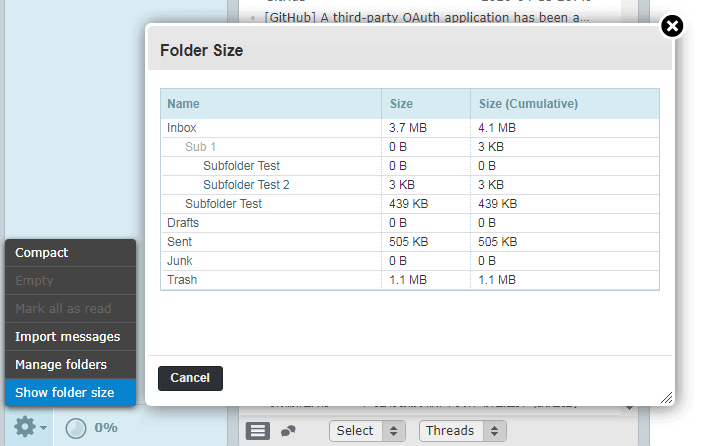
How to install this plugin in Roundcube
Install via Composer (Recommended)
This plugin has been published on Packagist by the name of jfcherng-roundcube/show-folder-size.
- Go to your
ROUNDCUBE_HOME(i.e., the root directory of your Roundcube). - Run
composer require jfcherng-roundcube/show-folder-size. - If you want to do plugin configuration, copy
config.inc.php.disttoconfig.inc.phpand then editconfig.inc.php.
Install manually
- Create folder
show_folder_sizeinROUNDCUBE_HOME/pluginsif it does not exist. - Copy all plugin files there.
- If you want to do plugin configuration, copy
config.inc.php.disttoconfig.inc.phpand then editconfig.inc.php. (You can skip this step since there is no configuration for this plugin at this moment.) - Edit your Roundcube's config file (
ROUNDCUBE_HOME/config/config.inc.phpor maybe/etc/roundcube/config.inc.php), locate$config['plugins']and add'show_folder_size',.
<?php // some other codes... $config['plugins'] = [ // some other plugins... 'show_folder_size', // <-- add this line ];
For Developers
Compile Frontend Assets
- You will need to have Node.js installed.
- Install dependencies via
npm install(oryarnif you prefer) - Compile assets with
./compile.sh
统计信息
- 总下载量: 13.62k
- 月度下载量: 0
- 日度下载量: 0
- 收藏数: 25
- 点击次数: 7
- 依赖项目数: 0
- 推荐数: 0
其他信息
- 授权协议: MIT
- 更新时间: 2026-01-04