jubaer/zoom-laravel
最新稳定版本:1.3.0
Composer 安装命令:
composer require jubaer/zoom-laravel
包简介
A comprehensive Zoom integration package for Laravel, providing easy-to-use API functionality to interact with the Zoom platform using PHP.
README 文档
README
The Laravel Zoom API Client is a powerful and comprehensive package designed to provide Laravel users with a unified and consistent approach to integrating Zoom APIs into their applications. With this package, developers can seamlessly interact with Zoom's feature-rich video communication platform, enabling them to create, manage, and enhance their Zoom meetings and webinars effortlessly.
Installation
You can install the package via composer:
composer require jubaer/zoom-laravel
Configuration file
Publish the configuration file
php artisan vendor:publish --provider="Jubaer\Zoom\ZoomServiceProvider"
then add config/app.php
'providers' => [
    // ...
    Jubaer\Zoom\ZoomServiceProvider::class,
];
then add config/app.php
'aliases' => [
    // ...
    'Zoom' => Jubaer\Zoom\Facades\Zoom::class,
];
This will create a zoom.php config file within your config directory for common user settings:-
return [
    'client_id' => env('ZOOM_CLIENT_KEY'),
    'client_secret' => env('ZOOM_CLIENT_SECRET'),
    'account_id' => env('ZOOM_ACCOUNT_ID'),
    'base_url' => 'https://api.zoom.us/v2/',
];
for a user specific user zoom configuration add User model:
    public static function clientID()
    {
        return 'zoom_client_of_user';
    }

    public static function clientSecret()
    {
        return 'zoom_client_secret_of_user';
    }

    public static function accountID()
    {
        return 'zoom_account_id_of_user';
    }
How to get Zoom API credentials
- Go to https://marketplace.zoom.us/develop/create and create a Server-to-Server OAuth app
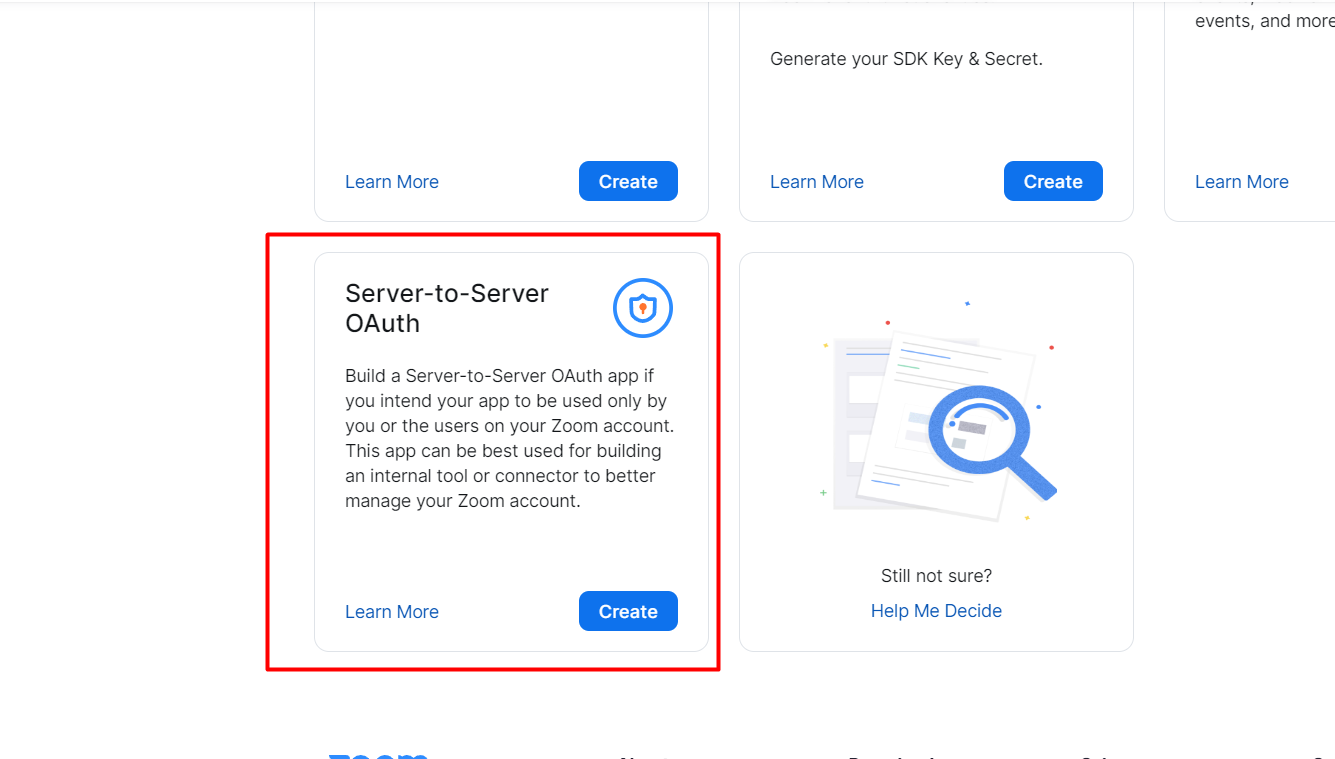
- then click on Continue
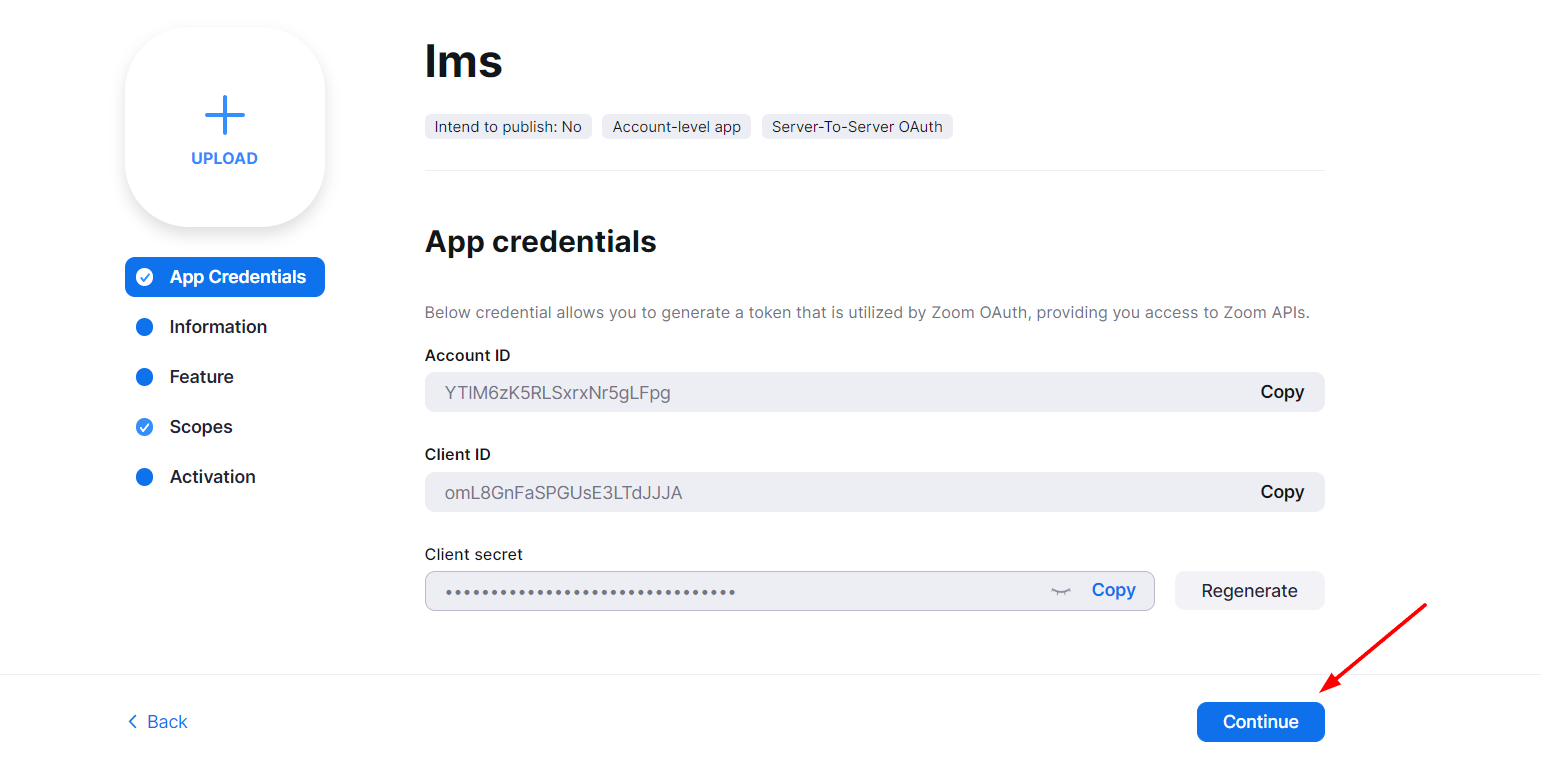
- then fill up the form and click on Continue
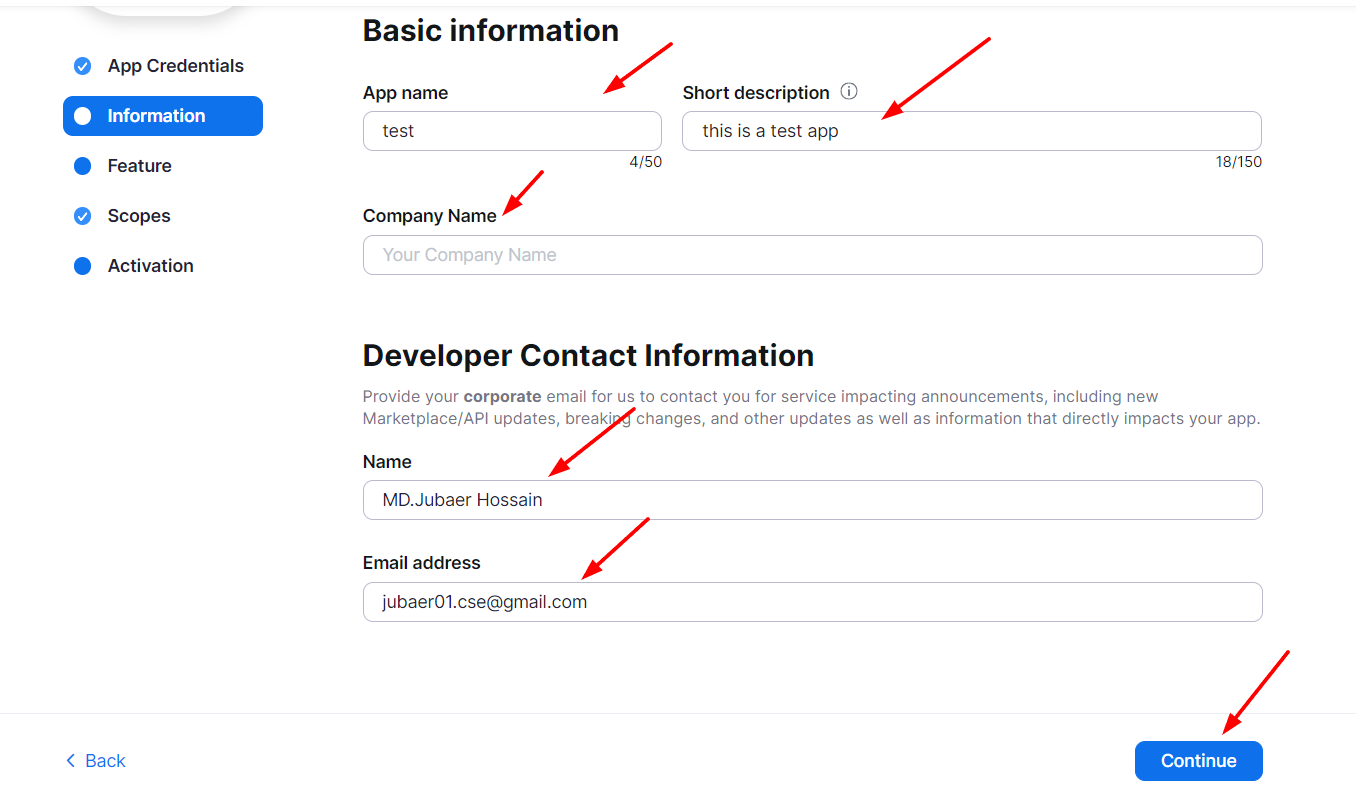
- then click on Continue
- then click on Add Scopes
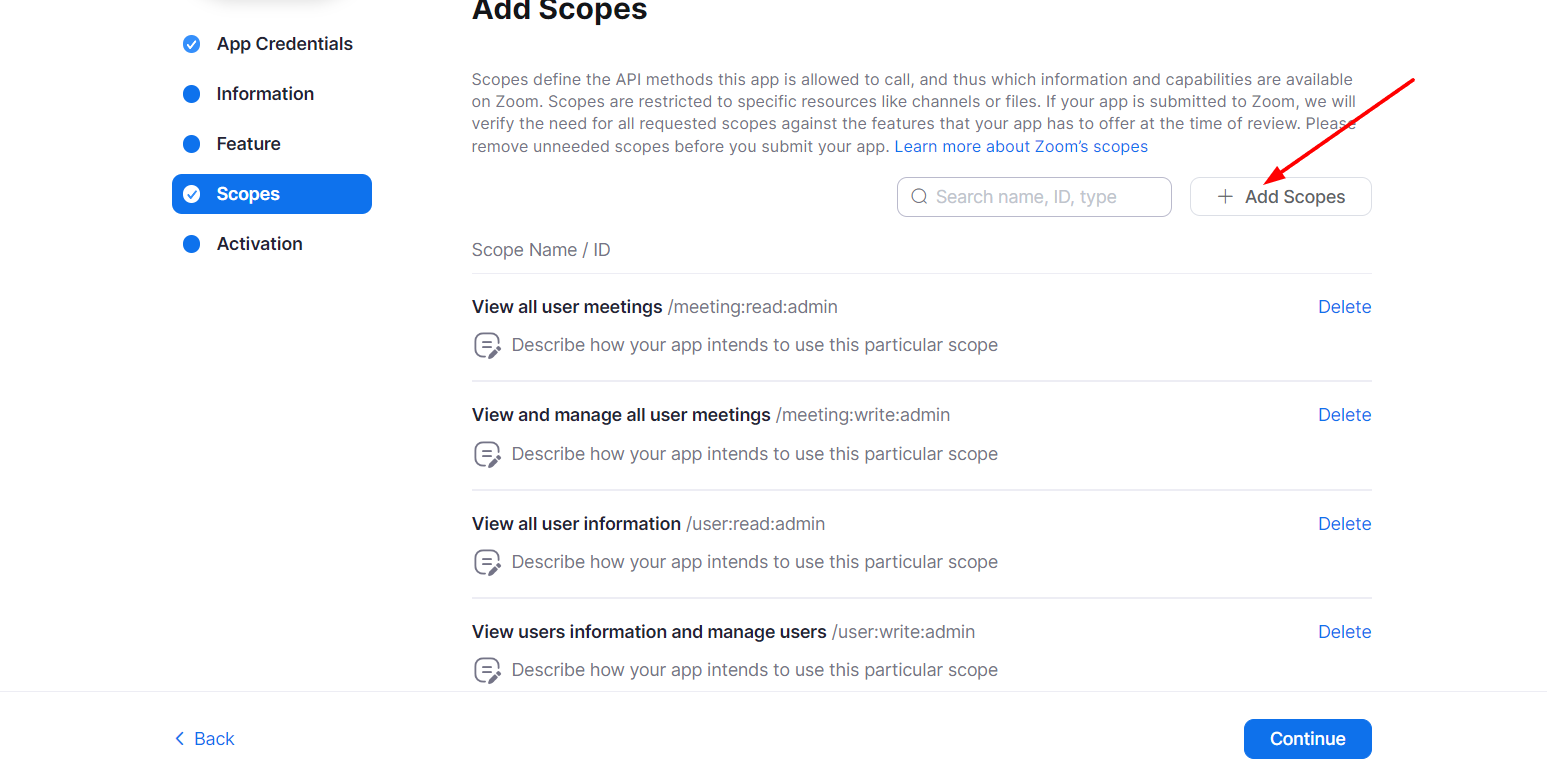
- then mark all scopes and click on Done
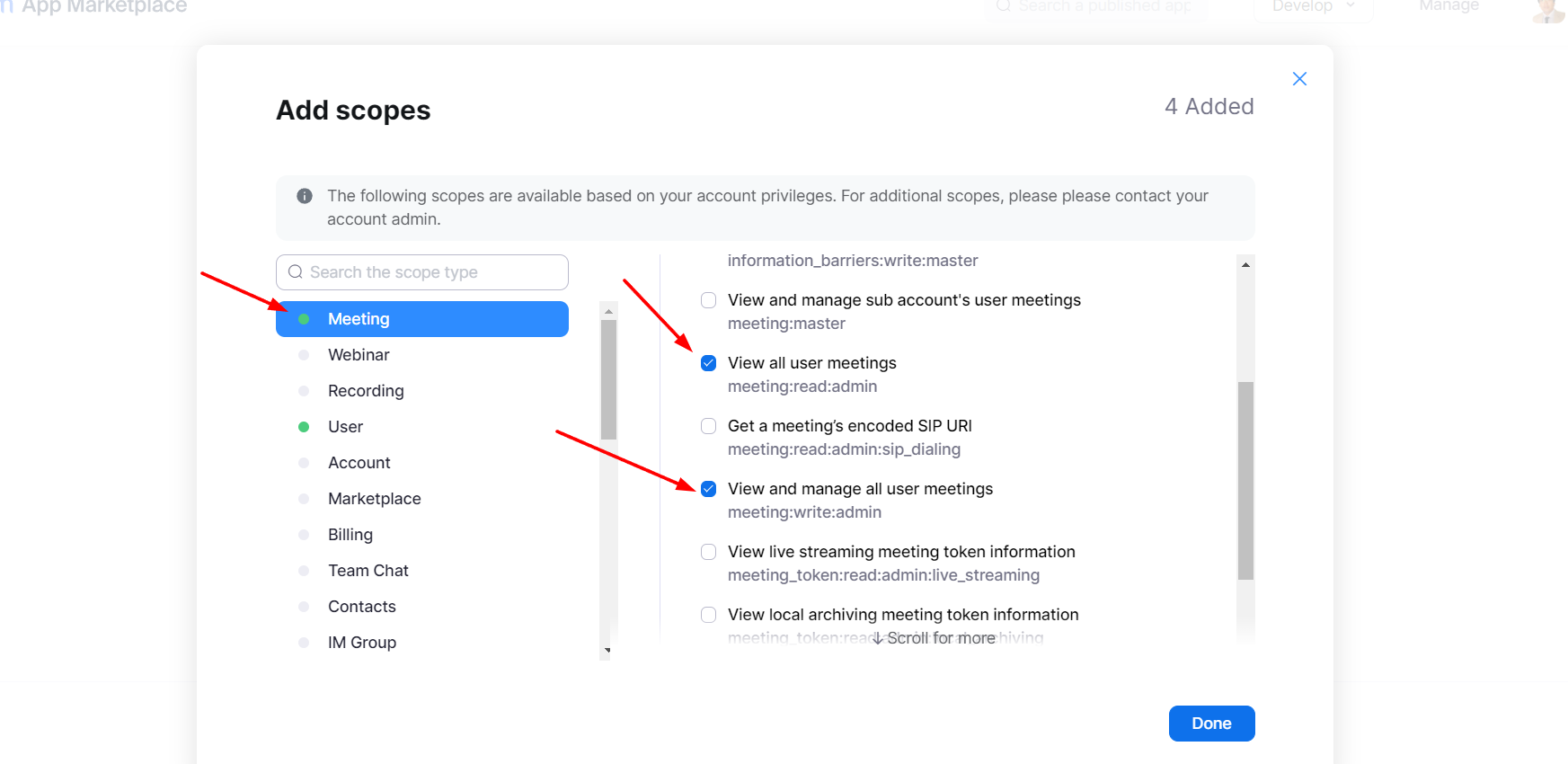
- then click on Continue
- then activate your app
- then copy your API Key and API Secret


Usage
At present we cover the following modules
- Users
- Meetings
- Past Meetings
- Webinars
- Past Webinars
- Recordings
- Past Recordings
Common get functions
Create a meeting
    $meetings = Zoom::createMeeting([
                    "agenda" => 'your agenda',
                    "topic" => 'your topic',
                    "type" => 2, // 1 => instant, 2 => scheduled, 3 => recurring with no fixed time, 8 => recurring with fixed time
                    "duration" => 60, // in minutes
                    "timezone" => 'Asia/Dhaka', // set your timezone
                    "password" => 'set your password',
                    "start_time" => 'set your start time', // set your start time
                    "template_id" => 'set your template id', // set your template id  Ex: "Dv4YdINdTk+Z5RToadh5ug==" from https://marketplace.zoom.us/docs/api-reference/zoom-api/meetings/meetingtemplates
                    "pre_schedule" => false,  // set true if you want to create a pre-scheduled meeting
                    "schedule_for" => 'set your schedule for profile email ', // set your schedule for
                    "settings" => [
                        'join_before_host' => false, // if you want to join before host set true otherwise set false
                        'host_video' => false, // if you want to start video when host join set true otherwise set false
                        'participant_video' => false, // if you want to start video when participants join set true otherwise set false
                        'mute_upon_entry' => false, // if you want to mute participants when they join the meeting set true otherwise set false
                        'waiting_room' => false, // if you want to use waiting room for participants set true otherwise set false
                        'audio' => 'both', // values are 'both', 'telephony', 'voip'. default is both.
                        'auto_recording' => 'none', // values are 'none', 'local', 'cloud'. default is none.
                        'approval_type' => 0, // 0 => Automatically Approve, 1 => Manually Approve, 2 => No Registration Required
                    ],

                ]);
Get a meeting
$meeting = Zoom::getMeeting($meetingId);
Update a meeting
    $meeting = Zoom::updateMeeting($meetingId, [
                    "agenda" => 'your agenda',
                    "topic" => 'your topic',
                    "type" => 2, // 1 => instant, 2 => scheduled, 3 => recurring with no fixed time, 8 => recurring with fixed time
                    "duration" => 60, // in minutes
                    "timezone" => 'Asia/Dhaka', // set your timezone
                    "password" => 'set your password',
                    "start_time" => 'set your start time', // set your start time
                    "template_id" => 'set your template id', // set your template id  Ex: "Dv4YdINdTk+Z5RToadh5ug==" from https://marketplace.zoom.us/docs/api-reference/zoom-api/meetings/meetingtemplates
                    "pre_schedule" => false,  // set true if you want to create a pre-scheduled meeting
                    "schedule_for" => 'set your schedule for profile email ', // set your schedule for
                    "settings" => [
                        'join_before_host' => false, // if you want to join before host set true otherwise set false
                        'host_video' => false, // if you want to start video when host join set true otherwise set false
                        'participant_video' => false, // if you want to start video when participants join set true otherwise set false
                        'mute_upon_entry' => false, // if you want to mute participants when they join the meeting set true otherwise set false
                        'waiting_room' => false, // if you want to use waiting room for participants set true otherwise set false
                        'audio' => 'both', // values are 'both', 'telephony', 'voip'. default is both.
                        'auto_recording' => 'none', // values are 'none', 'local', 'cloud'. default is none.
                        'approval_type' => 0, // 0 => Automatically Approve, 1 => Manually Approve, 2 => No Registration Required
                    ],

                ]);
Delete a meeting
$meeting = Zoom::deleteMeeting($meetingId);
Get all meetings
$meetings = Zoom::getAllMeeting();
Get a meeting
$meeting = Zoom::getMeeting($meetingId);
Get all upcoming meetings
$meetings = Zoom::getUpcomingMeeting();
Get all past meetings
$meetings = Zoom::getPreviousMeetings();
reschedule meeting
    $meetings = Zoom::rescheduleMeeting($meetingId, [
                    "agenda" => 'your agenda',
                    "topic" => 'your topic',
                    "type" => 2, // 1 => instant, 2 => scheduled, 3 => recurring with no fixed time, 8 => recurring with fixed time
                    "duration" => 60, // in minutes
                    "timezone" => 'Asia/Dhaka', // set your timezone
                    "password" => 'set your password',
                    "start_time" => 'set your start time', // set your start time
                    "template_id" => 'set your template id', // set your template id  Ex: "Dv4YdINdTk+Z5RToadh5ug==" from https://marketplace.zoom.us/docs/api-reference/zoom-api/meetings/meetingtemplates
                    "pre_schedule" => false,  // set true if you want to create a pre-scheduled meeting
                    "schedule_for" => 'set your schedule for profile email ', // set your schedule for
                    "settings" => [
                        'join_before_host' => false, // if you want to join before host set true otherwise set false
                        'host_video' => false, // if you want to start video when host join set true otherwise set false
                        'participant_video' => false, // if you want to start video when participants join set true otherwise set false
                        'mute_upon_entry' => false, // if you want to mute participants when they join the meeting set true otherwise set false
                        'waiting_room' => false, // if you want to use waiting room for participants set true otherwise set false
                        'audio' => 'both', // values are 'both', 'telephony', 'voip'. default is both.
                        'auto_recording' => 'none', // values are 'none', 'local', 'cloud'. default is none.
                        'approval_type' => 0, // 0 => Automatically Approve, 1 => Manually Approve, 2 => No Registration Required
                    ],

                ]);
end meeting
$meetings = Zoom::endMeeting($meetingId);
delete meeting
$meetings = Zoom::deleteMeeting($meetingId);
recover meeting
$meetings = Zoom::recoverMeeting($meetingId);
Get all users
$users = Zoom::getUsers(['status' => 'active']); // values are 'active', 'inactive', 'pending'. default is active. and you can pass page_size and page_number as well
Changelog
Please see CHANGELOG for more information what has changed recently.
Security
If you discover any security related issues, please email jubaer01.cse@gmail.com instead of using the issue tracker.
Credits
License
The MIT License (MIT). Please see License File for more information.
统计信息
- 总下载量: 93.36k
- 月度下载量: 0
- 日度下载量: 0
- 收藏数: 57
- 点击次数: 6
- 依赖项目数: 0
- 推荐数: 0
其他信息
- 授权协议: MIT
- 更新时间: 2026-01-04