kraenkvisuell/nova-tabs
最新稳定版本:v2.0.1
Composer 安装命令:
composer require kraenkvisuell/nova-tabs
包简介
Laravel Nova - Tabs
README 文档
README
This is a fork from https://github.com/eminiarts/nova-tabs. All the credit for this package goes to them.
We just forked it because development seems to have halted on the repo, and we needed to make some urgent changes. We intend to maintain this package, though, and when we are satisfied with its status, we might throw it up on novapackages (as yet another Laravel Nova Tabs Package).
Installation
You can install the package in to a Laravel app that uses Nova via composer:
composer require kraenkvisuell/nova-tabs
Usage
Tabs Panel

You can group Fields of a Resource into Tabs.
// in app/Nova/Resource.php

use Kraenkvisuell\Tabs\Tabs;

public function fields()
{
    return [

        new Tabs('Tabs', [
            'Balance'    => [
                Number::make('Balance', 'balance'),
                Number::make('Total', 'total'),
            ],
            'Other Info' => [
                Number::make('Paid To Date', 'paid_to_date'),
            ],
        ]),

    ];
}
Tabs with Toolbar
If you are only using Tabs without another default Panel, you can set withToolbar to true.

// in app/Nova/Resource.php

use Kraenkvisuell\Tabs\Tabs;

public function fields(Request $request)
    {
        return [

            (new Tabs('Contact Details', [
                'Address' => [
                    ID::make('Id', 'id')->rules('required'),
                    Text::make('Email', 'email')->sortable(),
                    Text::make('Phone', 'phone')->sortable(),
                ],

                'Relations' => [
                    BelongsTo::make('User'),
                    MorphTo::make('Contactable')->types([
                        Client::class,
                        Invoice::class,
                    ]),
                ]
            ]))->withToolbar(),

        ];
    }
Relationship Tabs

You can also group Relations into Tabs. Make sure to use the AvailableTabFields Trait in your Nova Resource.
// in app/Nova/Resource.php

use Kraenkvisuell\Tabs\Tabs;

class User extends Resource
{
    public function fields(Request $request)
    {
        return [

           new Tabs('Relations', [
                HasMany::make('Invoices'),
                HasMany::make('Notes'),
                HasMany::make('Contacts')
            ]),

        ];
    }

}
Combine Fields and Relations in Tabs


use Kraenkvisuell\Tabs\Tabs;

public function fields(Request $request)
{
    return [

        (new Tabs(__('Client Custom Details'), [
            new Panel(__('Details'), [
                    ID::make('Id', 'id')->rules('required')->hideFromIndex(),
                    Text::make('Name', 'name'),
            ]),
            HasMany::make('Invoices')
        ])

    ];
}
Actions in Tabs
If your Model uses the Laravel\Nova\Actions\Actionable Trait you can put the Actions into a Tab like this:
// in app/Nova/Resource.php

use Kraenkvisuell\Tabs\Tabs;
use Kraenkvisuell\Tabs\ActionsInTabs; // Add this Trait
use Laravel\Nova\Actions\ActionResource; // Import the Resource

class Client extends Resource
{
    use ActionsInTabs; // Use this Trait

    public function fields(Request $request)
    {
        return [

            (new Tabs('Client Custom Details', [
                'Address'  => [
                    ID::make('Id', 'id'),
                    Text::make('Name', 'name')->hideFromDetail(),
                ],
                'Invoices' => [
                    HasMany::make('Invoices'),
                ],
                'Actions'  => [
                    MorphMany::make(__('Actions'), 'actions', ActionResource::class), // Acc Actions whererver you like.
                ],
            ]))->withToolbar(),

        ];
    }
}
Tabs on Edit View

If you want to show Tabs on the Edit View, use the TabsOnEdit Trait in your Resource.
// in app/Nova/Resource.php

use Kraenkvisuell\Tabs\Tabs;
use Kraenkvisuell\Tabs\TabsOnEdit; // Add this Trait

class Client extends Resource
{
    use TabsOnEdit; // Use this Trait
    //...
}
Customization
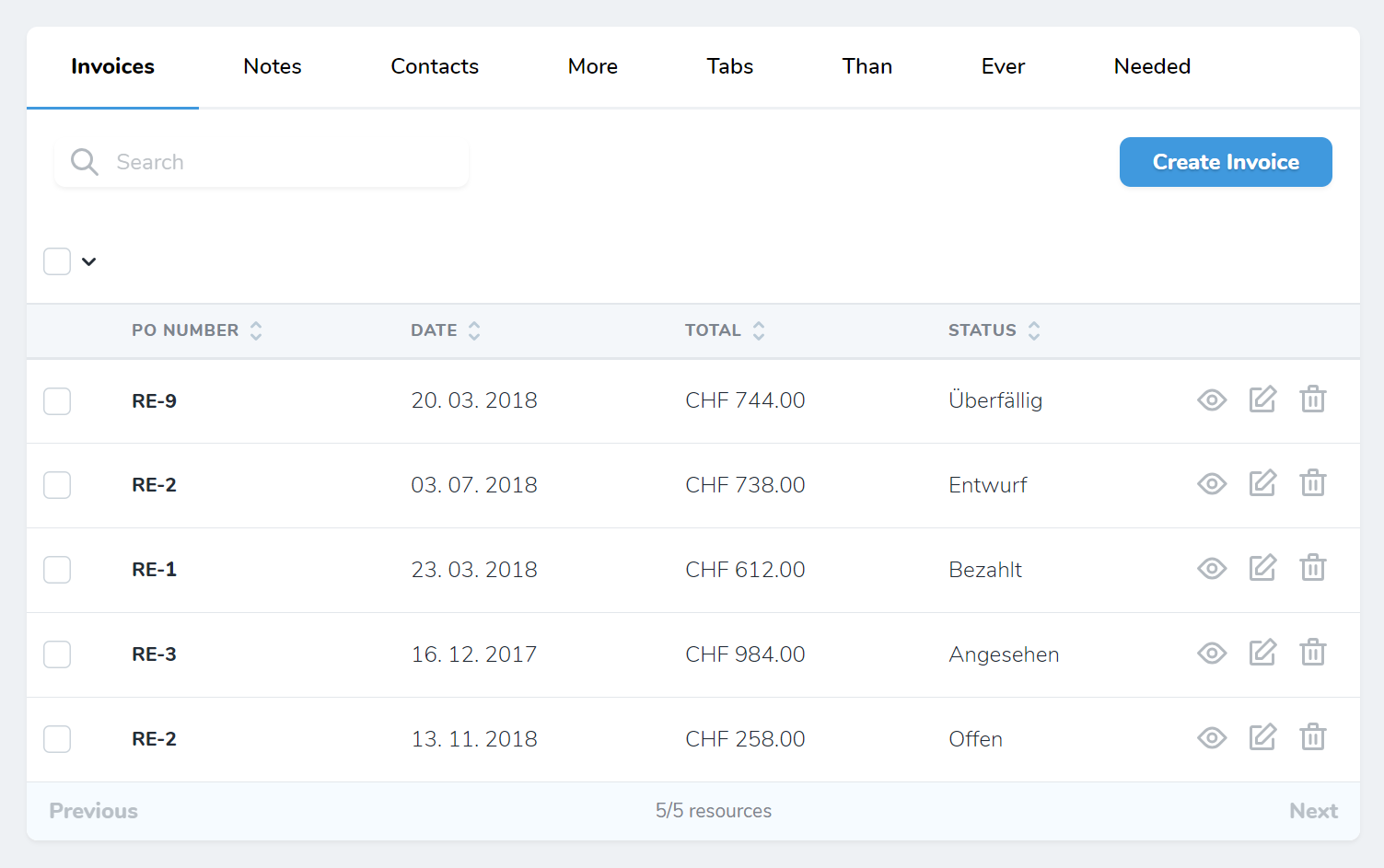
By default, the Tabs component moves the search input and the create button to the tabs. If you have a lot of tabs, you can move them back down to its own line:
// in app/Nova/Resource.php

use Kraenkvisuell\Tabs\Tabs;

class User extends Resource
{

    public function fields(Request $request)
    {
        return [

            (new Tabs('Relations', [
                HasMany::make('Invoices')
            ]))->defaultSearch(true),

        ];
    }
}
Set ->defaultSearch(true) to revert it to its default.
Upgrade to 1.0.0
Thanks to dkulyk/nova-tabs the Package got a lot simpler.
- No need to use a Trait anymore. Remove all
AvailableTabFieldsTraits in your Resources. - Everything is in
Tabsnow. There is noTabsPanelanymore. Remove allTabsPanelsand adjust your Fields according to this Readme.
统计信息
- 总下载量: 5
- 月度下载量: 0
- 日度下载量: 0
- 收藏数: 0
- 点击次数: 2
- 依赖项目数: 1
- 推荐数: 0
其他信息
- 授权协议: MIT
- 更新时间: 2024-01-26