kz370/scollio-logger
最新稳定版本:v1.0.0
Composer 安装命令:
composer require kz370/scollio-logger
包简介
Laravel 11 HTTP traffic & exception logger with AJAX dashboard and log rotation.
README 文档
README
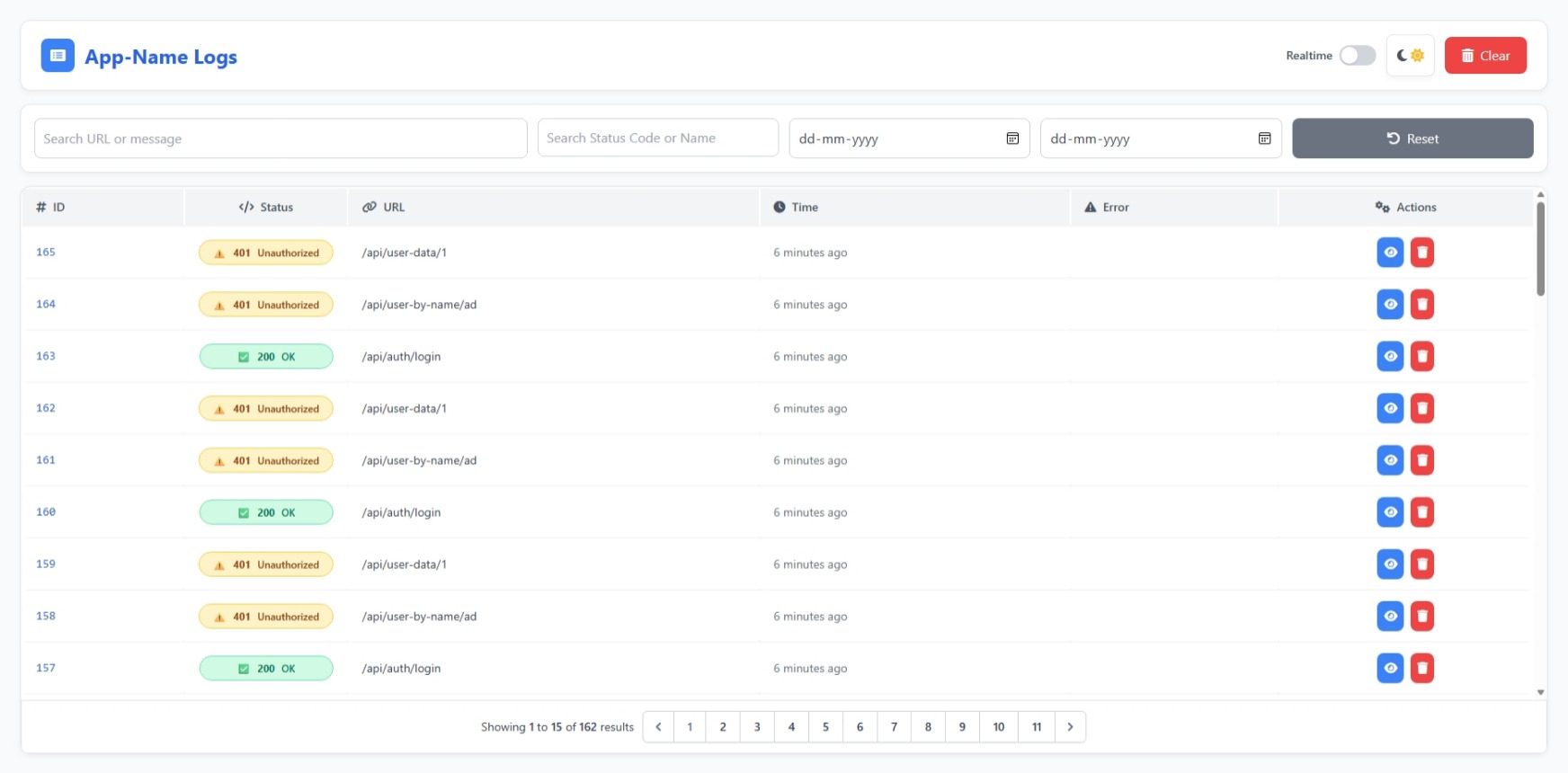
Scollio Logger is a Laravel 11-compatible HTTP traffic and exception logger that automatically records incoming requests, responses, and exceptions — complete with a beautiful AJAX-powered dashboard, configurable middleware control, and automatic log rotation.
Package:
kz370/scollio-logger
📚 Table of Contents
- Features
- Requirements
- Installation
- Publishing Assets
- Configuration
- Environment Variables Reference
- Middleware
- Request Logging
- Dashboard
- Log Rotation
- Table Schema
- Screenshots
- Troubleshooting
- License
🚀 Features
- 🧠 Automatic request, response, and exception logging
- 💾 Database-backed log storage (
scollio_loggertable) - 🖥️ AJAX-powered dashboard with filters and pagination
- 🔐 Middleware alias + optional global registration
- ⚙️ Configurable exclusions, key filtering, and rotation
- 📅 Log retention and automatic cleanup via command
- 🧩 Modular configuration compatible with Laravel 11
🧩 Requirements
| Requirement | Minimum Version |
|---|---|
| PHP | 8.2 |
| Laravel | 11.x |
| Database | MySQL / PostgreSQL / SQLite / SQL Server |
📦 Installation
composer require kz370/scollio-logger
Then publish assets and run migrations:
php artisan vendor:publish --tag=scollio-logger-config
php artisan vendor:publish --tag=scollio-logger-migrations
php artisan vendor:publish --tag=scollio-logger-views
php artisan migrate
Once installed, Scollio Logger automatically registers its routes, views, and middleware.
🛠 Publishing Assets
| Asset Type | Command |
|---|---|
| Config | php artisan vendor:publish --tag=scollio-logger-config |
| Migrations | php artisan vendor:publish --tag=scollio-logger-migrations |
| Views | php artisan vendor:publish --tag=scollio-logger-views |
⚙️ Configuration
All configuration values are found in config/scollio-logger.php and can be overridden using .env variables.
Example Core Config
return [
    'enabled' => env('SCOLLIO_ENABLED', true),

    'dashboard' => [
        'enabled' => env('SCOLLIO_LOGGER_DASHBOARD_ENABLED', true),
        'route' => env('SCOLLIO_LOGGER_DASHBOARD_ROUTE', 'scollio-logs/dashboard'),
        'prefix' => 'scollio-logs',
        'middleware' => ['auth:sanctum', 'web'],
        'pagination' => env('SCOLLIO_LOGGER_DASHBOARD_PAGINATION', 25),
    ],

    'middleware' => [
        'global' => env('SCOLLIO_LOGGER_MIDDLEWARE_GLOBAL', true),
    ],

    'paginate' => env('SCOLLIO_PAGINATE', 15),
    'log_web_routes' => env('SCOLLIO_LOG_WEB_ROUTES', true),
    'log_api_routes' => env('SCOLLIO_LOG_API_ROUTES', true),

    'ignore_status_codes' => array_filter(array_map('intval', explode(',', env('SCOLLIO_IGNORE_STATUS_CODES', '302,304,419,429')))),
    'only_status_codes' => array_filter(array_map('intval', explode(',', env('SCOLLIO_ONLY_STATUS_CODES', '')))),

    'retention_days' => env('SCOLLIO_RETENTION_DAYS', 30),
    'rotation_every_minutes' => env('SCOLLIO_ROTATION_EVERY_MINUTES', 1440),
];
⚙️ Environment Variables Reference
| Category | Environment Key | Description | Default | Type |
|---|---|---|---|---|
| Core | SCOLLIO_ENABLED |
Enable or disable Scollio Logger globally | true |
boolean |
SCOLLIO_PAGINATE |
Default pagination limit | 15 |
integer |
|
| Dashboard | SCOLLIO_LOGGER_DASHBOARD_ENABLED |
Enable or disable the dashboard route | true |
boolean |
SCOLLIO_LOGGER_DASHBOARD_ROUTE |
Dashboard route URI | scollio-logs/dashboard |
string |
|
SCOLLIO_LOGGER_DASHBOARD_PAGINATION |
Number of logs displayed per page | 25 |
integer |
|
SCOLLIO_LOGGER_MIDDLEWARE_GLOBAL |
Register logger middleware globally | true |
boolean |
|
| Request Logging | SCOLLIO_LOG_WEB_ROUTES |
Log web routes | true |
boolean |
SCOLLIO_LOG_API_ROUTES |
Log API routes | true |
boolean |
|
SCOLLIO_IGNORE_STATUS_CODES |
Skip these status codes | 302,304,419,429 |
string |
|
SCOLLIO_ONLY_STATUS_CODES |
Only log specific status codes | (empty) | string |
|
| Rotation | SCOLLIO_RETENTION_DAYS |
Number of days to keep logs | 30 |
integer |
SCOLLIO_ROTATION_EVERY_MINUTES |
Minimum interval between rotations | 1440 |
integer |
✅ Example .env
SCOLLIO_ENABLED=true
SCOLLIO_PAGINATE=15

# Dashboard
SCOLLIO_LOGGER_DASHBOARD_ENABLED=true
SCOLLIO_LOGGER_DASHBOARD_ROUTE=scollio-logs/dashboard
SCOLLIO_LOGGER_DASHBOARD_PAGINATION=25
SCOLLIO_LOGGER_MIDDLEWARE_GLOBAL=true

# Route Logging
SCOLLIO_LOG_WEB_ROUTES=true
SCOLLIO_LOG_API_ROUTES=true
SCOLLIO_IGNORE_STATUS_CODES=302,304,419,429
SCOLLIO_ONLY_STATUS_CODES=

# Rotation & Retention
SCOLLIO_RETENTION_DAYS=30
SCOLLIO_ROTATION_EVERY_MINUTES=1440
🧱 Middleware
Scollio Logger provides both a route middleware alias and an optional global middleware registration.
| Mode | Description | How to Enable |
|---|---|---|
| Alias | Add scollio-logger to specific routes |
Always available |
| Global | Automatically logs every request | Controlled by config (SCOLLIO_LOGGER_MIDDLEWARE_GLOBAL) |
Example Usage:
Route::middleware(['web', 'scollio-logger'])->group(function () {
    Route::get('/dashboard', [DashboardController::class, 'index']);
});
🛰️ Request Logging
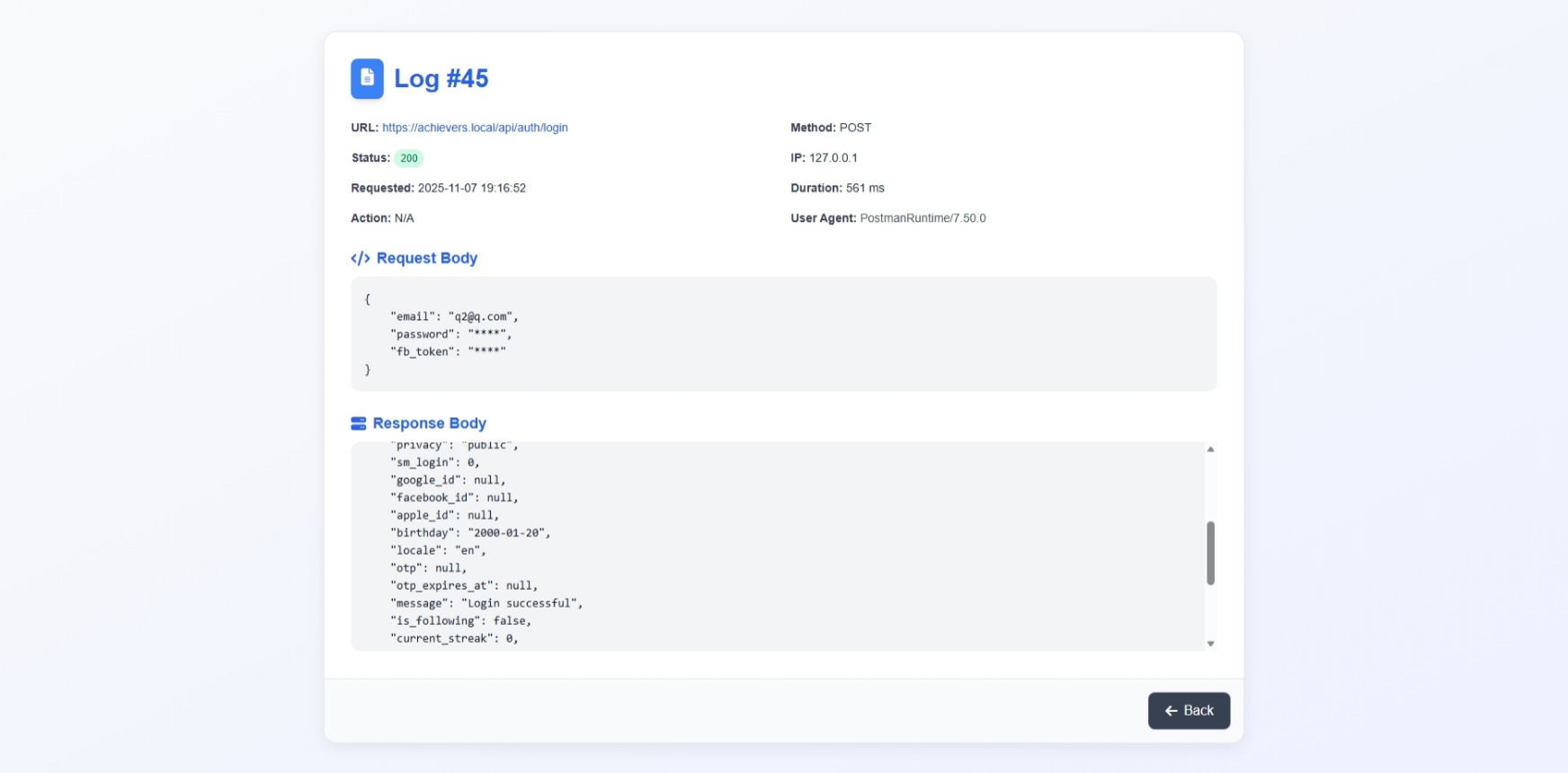
When enabled, Scollio captures each request and response with metadata such as method, URL, status code, controller, and duration.
Example Log Entry:
{
  "method": "GET",
  "url": "https://example.com/api/users/5",
  "status_code": 200,
  "duration_ms": 152,
  "controller_action": "App\\Http\\Controllers\\UserController@show"
}
🚦 Dashboard
Visit your dashboard at:
/scollio-logs/dashboard
Dashboard Features
- Live AJAX search and filtering
- Filter by method, status, or message
- View full request and response payloads
- View exception details and traces
- Delete individual or all logs
- Auto-refresh every few seconds
- Protected by configurable middleware
🧹 Log Rotation
Scollio includes an Artisan command for automatic cleanup:
php artisan scollio:rotate
This deletes logs older than the configured retention period.
SCOLLIO_RETENTION_DAYS=30
SCOLLIO_ROTATION_EVERY_MINUTES=1440
📄 Table Schema
Table name: scollio_logger
| Column | Description |
|---|---|
method, url, status_code |
Request metadata |
headers, body, response_headers, response_body |
Serialized request/response data |
exception_message, exception_trace |
Exception info |
requested_at, responded_at, duration_ms |
Timing metrics |
route_action, user_id, session_id, request_id |
Contextual info |
🖼️ Screenshots
🧩 Troubleshooting
| Issue | Possible Cause | Recommended Solution |
|---|---|---|
| No logs showing | Logging disabled, migrations not run, or middleware missing | 1. Ensure .env has SCOLLIO_ENABLED=true. 2. Run php artisan migrate. 3. If using alias, ensure routes include scollio-logger. |
| Dashboard 404 | Routes not cached or dashboard disabled | 1. Run php artisan route:clear. 2. Ensure SCOLLIO_LOGGER_DASHBOARD_ENABLED=true. 3. Visit /scollio-logs/dashboard. |
| Old data not deleting | Rotation not scheduled | 1. Confirm SCOLLIO_RETENTION_DAYS and SCOLLIO_ROTATION_EVERY_MINUTES. 2. Add scheduler entry: $schedule->command('scollio:rotate')->daily(); |
| Performance issues | Too much payload or high retention | 1. Lower retention days. 2. Exclude unnecessary routes using skip_routes. |
📜 License
Released under the MIT License.
🧩 Scollio Logger — Smart, structured, and searchable HTTP and exception logging for Laravel.
统计信息
- 总下载量: 13
- 月度下载量: 0
- 日度下载量: 0
- 收藏数: 0
- 点击次数: 3
- 依赖项目数: 0
- 推荐数: 0
其他信息
- 授权协议: MIT
- 更新时间: 2025-11-07