mgrechanik/image-points-searcher
最新稳定版本:1.0.1
Composer 安装命令:
composer require mgrechanik/image-points-searcher
包简介
This library allows to find the coordinates of the points you are looking for on an image
README 文档
README
Table of contents
Goal
This library allows to find the coordinates of the points you are looking for on an image (jpg format).
The point is the set of nearby pixels of choosen color.
For example, when you draw a graph on the image, we will find it's vertices.
Out of the box we have two strategies to determite our points.
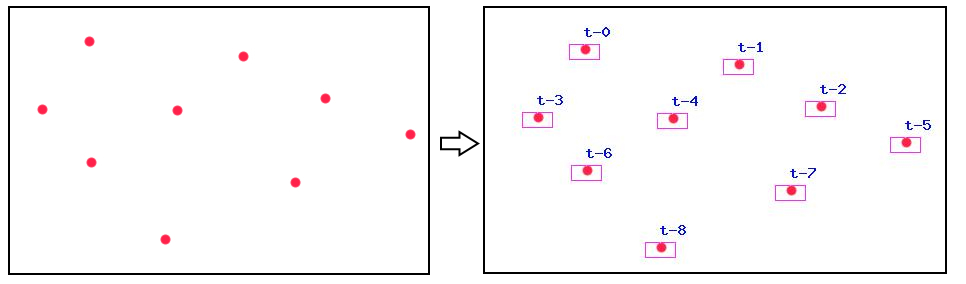
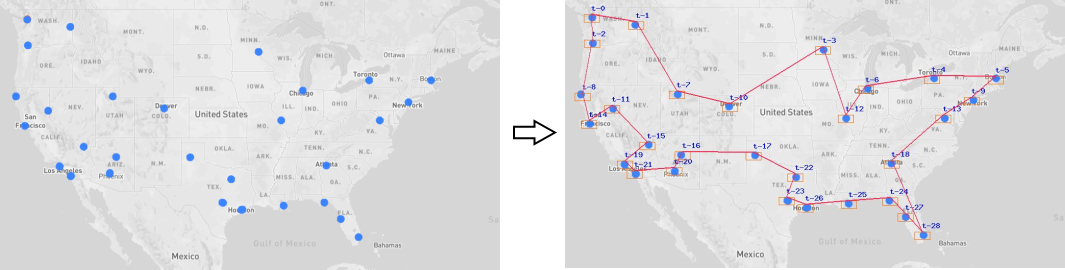
DifferentColorsStrategy- when the point is different from background color. Default behavior. See Demo, picture 1.ChoosenColorStrategy- when point is defined by it's exact color. See Demo, picture 2.
You can create your own strategy and use it.
Points could be of different size, so they could be easily seen, not just 1px size. We use parameter Searcher::$margin to determine all those pixels as one point.
The result of the search work is an array of points, represented by their X and Y coordinates.
We also give you ImageResult, who creates the image of the search result:
- We can add labels to points we found
- The borders of the points we found could be shown to better understand search process
- We could draw a path between points
Demo
Determine points with DifferentColorsStrategy strategy , Picture 1:
Determine points with ChoosenColorStrategy strategy, Picture 2:
Installing
Installing through composer:
The preferred way to install this library is through composer.
Either run
composer require --prefer-dist mgrechanik/image-points-searcher
or add
"mgrechanik/image-points-searcher" : "~1.0.0"
to the require section of your composer.json.
Search for points
Search for points with DifferentColorsStrategy strategy
try {
  $searcher = new \mgrechanik\imagepointssearcher\Searcher(
    './images/graph.jpg'
  );
  $count = $searcher->run();
  print 'Found - ' . $count;
  $points = $searcher->getPoints();
  var_dump($points);
} catch (Exception $e) {

}
The result will be like this:
Found - 2
[
	['x' => 10, 'y' => 10],
	['x' => 80, 'y' => 80],
]
Search for points with ChoosenColorStrategy strategy
try {
  $searcher = new \mgrechanik\imagepointssearcher\Searcher(
    './images/usa.jpg',
    new \mgrechanik\imagepointssearcher\ChoosenColorStrategy(60, 132, 253)
  );
  $count = $searcher->run();
  print 'Found - ' . $count;
  $points = $searcher->getPoints();
  var_dump($points);
} catch (Exception $e) {

}
Display search result
$imageResult = new \mgrechanik\imagepointssearcher\ImageResult($searcher);

// We can set colors
$imageResult->setLabelsColor(1, 14, 230);
$imageResult->setLinesColor(255, 33, 73);
$imageResult->setMarginsColor(255, 106, 0);


// Draw default labels
$imageResult->drawLabels();
// Draw labels with the text we want
$imageResult->drawLabels(function($key, $point) { return "{$point['x']},{$point['y']}";});

// Draw borders of the points we found
$imageResult->drawMargins();

// Draw the path between points
$imageResult->drawPath([2,9,20,28,41,48,44]);

// Save the result as the image. See Demo.
$imageResult->save('./images/result.jpg');
统计信息
- 总下载量: 28
- 月度下载量: 0
- 日度下载量: 0
- 收藏数: 0
- 点击次数: 4
- 依赖项目数: 0
- 推荐数: 0
其他信息
- 授权协议: BSD-3-Clause
- 更新时间: 2023-11-08