microweber-deps/radio-deck
最新稳定版本:1.0
Composer 安装命令:
composer require microweber-deps/radio-deck
包简介
Turn filament default radio button into a selectable card with icons, title and description.
README 文档
README
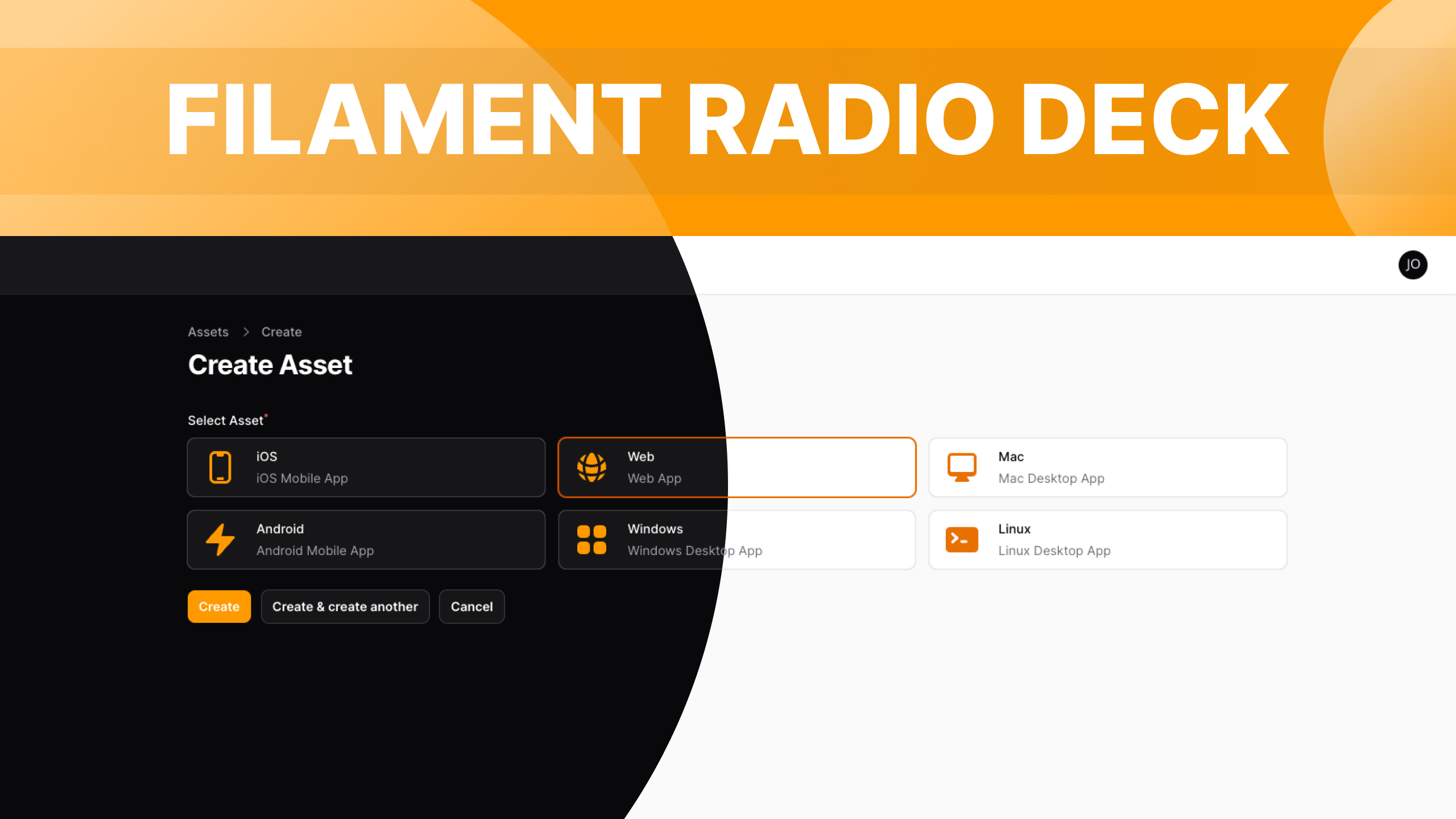
Turn filament default radio button into a selectable card with icons, title and description.
Installation
You can install the package via composer:
composer require jaocero/radio-deck
To adhere to Filament's theming approach, you'll be required to employ a personalized theme in order to utilize this plugin.
Custom Theme Installation Filament Docs
Add the plugin's views to your tailwind.config.js file.
content: [
    ...
    './vendor/jaocero/radio-deck/resources/views/**/*.blade.php',
]
Usage
use JaOcero\RadioDeck\Forms\Components\RadioDeck;
use Filament\Support\Enums\IconSize;
use Filament\Support\Enums\Alignment;
use Filament\Support\Enums\IconPosition;

public static function form(Form $form): Form
{
    return $form
        ->schema([
            RadioDeck::make('name')
                ->options([
                    'ios' => 'iOS',
                    'android' => 'Android',
                    'web' => 'Web',
                    'windows' => 'Windows',
                    'mac' => 'Mac',
                    'linux' => 'Linux',
                ])
                ->descriptions([
                    'ios' => 'iOS Mobile App',
                    'android' => 'Android Mobile App',
                    'web' => 'Web App',
                    'windows' => 'Windows Desktop App',
                    'mac' => 'Mac Desktop App',
                    'linux' => 'Linux Desktop App',
                ])
                ->icons([
                    'ios' => 'heroicon-m-device-phone-mobile',
                    'android' => 'heroicon-m-device-phone-mobile',
                    'web' => 'heroicon-m-globe-alt',
                    'windows' => 'heroicon-m-computer-desktop',
                    'mac' => 'heroicon-m-computer-desktop',
                    'linux' => 'heroicon-m-computer-desktop',
                ])
                ->required()
                ->iconSize(IconSize::Large) // Small | Medium | Large | (string - sm | md | lg)
                ->iconSizes([ // Customize the values for each icon size
                    'sm' => 'h-12 w-12',
                    'md' => 'h-14 w-14',
                    'lg' => 'h-16 w-16',
                ])
                ->iconPosition(IconPosition::Before) // Before | After | (string - before | after)
                ->alignment(Alignment::Center) // Start | Center | End | (string - start | center | end)
                ->gap('gap-5') // Gap between Icon and Description (Any TailwindCSS gap-* utility)
                ->padding('px-4 px-6') // Padding around the deck (Any TailwindCSS padding utility)
                ->direction('column') // Column | Row (Allows to place the Icon on top)
                ->extraCardsAttributes([ // Extra Attributes to add to the card HTML element
                    'class' => 'rounded-xl'
                ])
                ->extraOptionsAttributes([ // Extra Attributes to add to the option HTML element
                    'class' => 'text-3xl leading-none w-full flex flex-col items-center justify-center p-4'
                ])
                ->extraDescriptionsAttributes([ // Extra Attributes to add to the description HTML element
                    'class' => 'text-sm font-light text-center'
                ])
                ->color('primary') // supports all color custom or not
                ->multiple() // Select multiple card (it will also returns an array of selected card values)
                ->columns(3)
        ])
        ->columns('full');
}
You can also utilize an Enum class for ->options(), ->descriptions(), and ->icons() . Here's an example of how to create a simple enum class for this purpose:
<?php

namespace App\Filament\Enums;

use Filament\Support\Contracts\HasLabel;
use JaOcero\RadioDeck\Contracts\HasDescriptions;
use JaOcero\RadioDeck\Contracts\HasIcons;

enum AssetType: string implements HasLabel, HasDescriptions, HasIcons
{
    case iOs = 'ios';
    case Android = 'android';
    case Web = 'web';
    case Windows = 'windows';
    case Mac = 'mac';
    case Linux = 'linux';

    public function getLabel(): ?string
    {
        return match ($this) {
            self::iOs => 'iOS',
            self::Android => 'Android',
            self::Web => 'Web',
            self::Windows => 'Windows',
            self::Mac => 'Mac',
            self::Linux => 'Linux',
        };
    }

    public function getDescriptions(): ?string
    {
        return match ($this) {
            self::iOs => 'iOS Mobile App',
            self::Android => 'Android Mobile App',
            self::Web => 'Web App',
            self::Windows => 'Windows Desktop App',
            self::Mac => 'Mac Desktop App',
            self::Linux => 'Linux Desktop App',
        };
    }

    public function getIcons(): ?string
    {
        return match ($this) {
            self::iOs => 'heroicon-m-device-phone-mobile',
            self::Android => 'heroicon-m-device-phone-mobile',
            self::Web => 'heroicon-m-globe-alt',
            self::Windows => 'heroicon-m-computer-desktop',
            self::Mac => 'heroicon-m-computer-desktop',
            self::Linux => 'heroicon-m-computer-desktop',
        };
    }
}
After that, in your form, you can set it up like this:
public static function form(Form $form): Form
{
    return $form
        ->schema([
            RadioDeck::make('name')
                ->options(AssetType::class)
                ->descriptions(AssetType::class)
                ->icons(AssetType::class)
                ->required()
                ->iconSize(IconSize::Large)
                ->iconPosition(IconPosition::Before)
                ->alignment(Alignment::Center)
                ->color('danger')
                ->columns(3),
        ])
        ->columns('full');
}
Changelog
Please see CHANGELOG for more information on what has changed recently.
Contributing
Please see CONTRIBUTING for details.
Security Vulnerabilities
Please review our security policy on how to report security vulnerabilities.
Credits
License
The MIT License (MIT). Please see License File for more information.
统计信息
- 总下载量: 2
- 月度下载量: 0
- 日度下载量: 0
- 收藏数: 0
- 点击次数: 7
- 依赖项目数: 0
- 推荐数: 0
其他信息
- 授权协议: MIT
- 更新时间: 2025-07-19