moonshine/tinymce
最新稳定版本:2.0.0
Composer 安装命令:
composer require moonshine/tinymce
包简介
TinyMce editor for MoonShine
关键字:
README 文档
README
Extends Textarea and has the same features
Important
Before using this field, you must register on the site at Tiny.Cloud, get the token and add it to the .env
TINYMCE_TOKEN="YOUR_TOKEN"
Compatibility
| MoonShine | Moonshine TinyMce | Currently supported |
|---|---|---|
| >= v3.0 | >= v1.0.0 | yes |
| >= v4.0 | >= v2.0.0 | yes |
Installation
composer require moonshine/tinymce
Usage
use MoonShine\TinyMce\Fields\TinyMce;


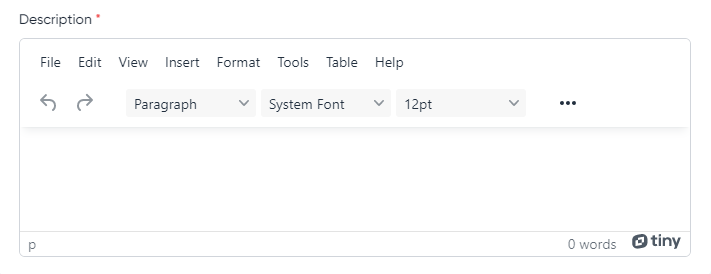
TinyMce::make('Description')
Default config
TinyMce field uses the most common settings such as plugins, menubar and toolbar by default
To change the default settings, you need to publish the configuration file:
php artisan vendor:publish --tag="moonshine-tinymce-config"
You can also add additional options to the configuration file that will apply to all TinyMce fields
'options' => [
    'forced_root_block' => 'div',
    'force_br_newlines' => true,
    'force_p_newlines' => false,
],
Locale
The default is your application's locale, but using the locale() method you can define a specific locale
locale(string $locale)
TinyMce::make('Description')
    ->locale('ru');
English (en), Russian (ru) and Ukrainian (uk) are currently available, but we are always ready to add the others.
To add new localizations, create an issue or make a pull request
Plugins
The plugins() method allows you to completely override the plugins that the field will use
plugins(array $plugins)
TinyMce::make('Description')
    ->plugins(['code', 'image', 'link', 'media', 'table'])
The addPlugins() method allows you to add new plugins to the default plugins
addPlugins(array $plugins)
TinyMce::make('Description')
    ->addPlugins(['wordcount'])
The removePlugins() method allows you to exclude plugins that the field will use
removePlugins(array $plugins)
TinyMce::make('Description')
    ->removePlugins(['autoresize'])
Menubar
The menubar() method allows you to completely override menubar for a field
menubar(string|bool $menubar)
TinyMce::make('Description')
    ->menubar('file edit view')
Toolbar
The toolbar() method allows you to completely override toolbar for a field
toolbar(string|bool|array $toolbar)
TinyMce::make('Description')
    ->toolbar('file edit view')
Options
The addOption() method allows you to add additional options for a field
addOption(string $name, string|int|float|bool|array $value)
TinyMce::make('Description')
    ->addOption('forced_root_block', 'div')
The addCallback() method allows you to add callback options for a field
addCallback(string $name, string $value)
TinyMce::make('Description')
    ->addCallback('setup', '(editor) => console.log(editor)')
Note
You can use string, number, boolean and array as values.
File manager
If you want to use the file manager in TinyMce, you need to install the package Laravel FileManager
Installation
composer require unisharp/laravel-filemanager

php artisan vendor:publish --tag=lfm_config
php artisan vendor:publish --tag=lfm_public
Note
Be sure to set the 'use_package_routes' flag in the lfm config to false, otherwise caching routes will cause an error.
// config/lfm.php

'use_package_routes' => false,
Routes file
Create a routes file like routes/moonshine.php and register the LaravelFilemanager routes.
use Illuminate\Support\Facades\Route;
use UniSharp\LaravelFilemanager\Lfm;

Route::prefix('laravel-filemanager')->group(function () {
    Lfm::routes();
});
File registration
Register the generated routes file in app/Providers/RouteServiceProvider.php
Warning
The route file must be in the middleware moonshine group!
public function boot()
{
    // ...

    $this->routes(function () {
        // ...

        Route::middleware('moonshine')
            ->namespace($this->namespace)
            ->group(base_path('routes/moonshine.php'));
    });
}
Important
In order to allow access only to users authorized in the admin panel you need to add middleware MoonShine\Laravel\Http\Middleware\Authenticate.
use MoonShine\Laravel\Http\Middleware\Authenticate;

// ...

public function boot()
{
    // ...

    $this->routes(function () {
        // ...

        Route::middleware(['moonshine', Authenticate::class])
            ->namespace($this->namespace)
            ->group(base_path('routes/moonshine.php'));
    });
}
Configuration
You need to add an option for the field
TinyMce::make('Description')
    ->addOption('file_manager', 'laravel-filemanager')
or add in the config/moonshine_tinymce.php configuration file to apply to all TinyMCe fields
'options' => [
    'file_manager' => 'laravel-filemanager',
],
统计信息
- 总下载量: 17.45k
- 月度下载量: 0
- 日度下载量: 0
- 收藏数: 4
- 点击次数: 3
- 依赖项目数: 0
- 推荐数: 0
其他信息
- 授权协议: MIT
- 更新时间: 未知