novadaemon/filament-combobox
最新稳定版本:v2.1.1
Composer 安装命令:
composer require novadaemon/filament-combobox
包简介
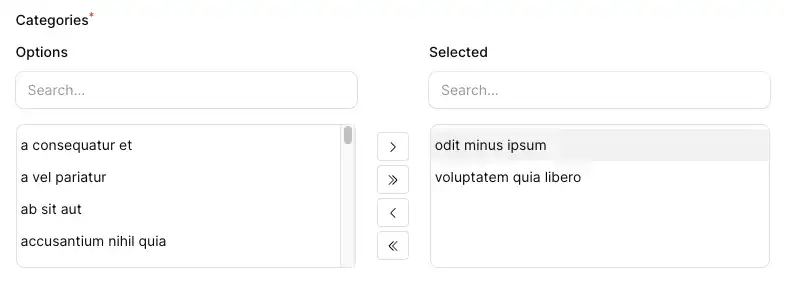
Side by side combobox multiselect field to use in your FilamentPHP forms
关键字:
README 文档
README
Side by side combobox multiselect field to use in your FilamentPHP forms.

Installation
You can install the package via composer:
composer require novadaemon/filament-combobox
This package supports Filament 3.x and 4.x
Usage
Simply use the component as you'd use any other Filament field. It's especially perfect for the resource view page where it blends right in.
use Novadaemon\FilamentCombobox\Combobox;

class FileResource extends Resource
{
    public static function form(Form $form): Form
    {
        return $form
            ->schema([
                Combobox::make('vegetables')
                ->options([
                    'carrot' => 'Carrot',
                    'potato' => 'Potato',
                    'tomato' => 'Tomato',
                ])
            ]);
    }
}
Since the Combobox component extends the Filament\Forms\Components\Select class, it is possible to use almost all methods of the parent component.
Integrating with an Eloquent relationship
use Novadaemon\FilamentCombobox\Combobox;

class FileResource extends Resource
{
    public static function form(Form $form): Form
    {
        return $form
            ->schema([
                Combobox::make('categories')
                ->relationship('categories', 'name')
            ]);
    }
}
Customize
Enabling search in the boxes
use Novadaemon\FilamentCombobox\Combobox;

class FileResource extends Resource
{
    public static function form(Form $form): Form
    {
        return $form
            ->schema([
                Combobox::make('categories')
                ->relationship('categories', 'name')
                ->boxSearchs()
            ]);
    }
}
The boxSearchs method accepts a boolean or closure callback function.
class FileResource extends Resource
{
    public static function form(Form $form): Form
    {
        return $form
            ->schema([
                Combobox::make('categories')
                ->relationship('categories', 'name')
                ->boxSearchs(fn() => auth()->user()->isAdmin())
            ]);
    }
}
Modifying the height of the component
Yo can change the height of the component using the height method:
class FileResource extends Resource
{
    public static function form(Form $form): Form
    {
        return $form
            ->schema([
                Combobox::make('categories')
                ->relationship('categories', 'name')
                ->height('500px')
            ]);
    }
}
Customize the label of the boxes
Changing the label of the boxes:
class FileResource extends Resource
{
    public static function form(Form $form): Form
    {
        return $form
            ->schema([
                Combobox::make('categories')
                ->relationship('categories', 'name')
                ->optionsLabel('Available categories')
                ->selectedLabel('Selected categories')
            ]);
    }
}
Hiding the label on the boxes:
class FileResource extends Resource
{
    public static function form(Form $form): Form
    {
        return $form
            ->schema([
                Combobox::make('categories')
                ->relationship('categories', 'name')
                ->showLabels(false)
            ]);
    }
}
Translations
Optionally, you can publish the translations using
php artisan vendor:publish --tag="filament-combobox-translations"
Now, yo can modify or add custom translation files.
Contributing
Contributing is pretty chill and is highly appreciated! Just send a PR and/or create an issue!
Credits
License
The MIT License (MIT). Please see License File for more information.
Screenshot
统计信息
- 总下载量: 14.56k
- 月度下载量: 0
- 日度下载量: 0
- 收藏数: 25
- 点击次数: 4
- 依赖项目数: 1
- 推荐数: 0
其他信息
- 授权协议: MIT
- 更新时间: 未知