parfaitementweb/filament-plugin-translatable-inline
最新稳定版本:4.0.1
Composer 安装命令:
composer require parfaitementweb/filament-plugin-translatable-inline
包简介
An inline translation plugin for Filament 4.
README 文档
README
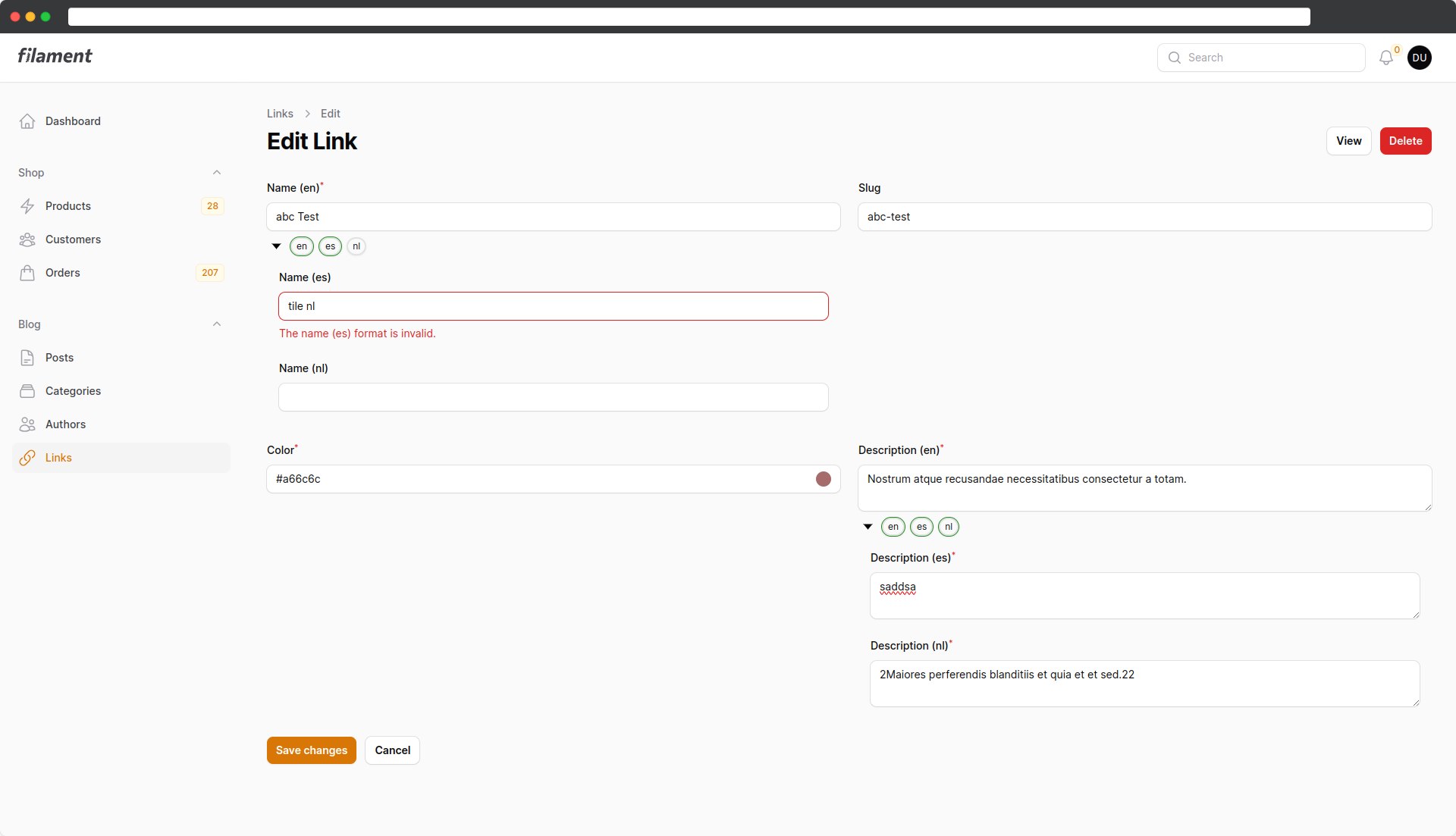
This is an addon to Filament Larazeus Translatable that allows you to edit your translation directly below the field.
This approach offers several advantages:
- Faster editing of your translations
- Detecting fields that can be translated is much easier to see
- You can quickly see which translations are missing
Screenshots
Requirements
You need the latest version of:
- Filament v4.
- Filament Translatable Plugin
Installation
Install the package via composer:
composer require parfaitementweb/filament-plugin-translatable-inline:"^4.0"
Also install the Filament Translatable Plugin, if not already:
composer require lara-zeus/spatie-translatable
Configuration
It is important that you don't add the Filament traits and the header action to your form resource pages, or it won't work! Only the trait "Translatable" in your resource is required!
Instead of having the locale switcher, wrap your fields in add a TranslatableContainer.
<?php

...

use Parfaitementweb\FilamentPluginTranslatableInline\Forms\Components\TranslatableContainer;

...

    public static function form(Form $form): Form
        {
            return $form
                ->schema([
                    TranslatableContainer::make(
                        Forms\Components\TextInput::make('title')
                            ->maxLength(255)
                            ->required()
                    )
                       ->onlyMainLocaleRequired() // optional
                       ->requiredLocales(['en', 'es']) // optional
                    ,

...
For each field that can be translated, simply repeat this process, and you'll be done.
TIP: You don't have to globally choose between inline or dropdown. Instead, you can choose an option on each page. For instance, it makes sense to have the dropdown in the list view and then use the inline version when editing.
Options
onlyMainLocaleRequired
Sometimes you might want the field to be required, but only for the primary language. For example, if you set the TextInput to 'required,' it applies to all language variants. This is where this option comes into play. It removes the 'required' validation for all other languages except the primary one.
requireLocales
If you have more than one required locales you can pass an array to this method.
Tips & Hints
Validation
If all of your locales are required and if your values do not pass the JS validation, then the variants will remain automatically expanded.
afterStateUpdated
If you want to use "afterStateUpdated", you have to consider that the state path shifts by one level. n addition, one must specify the locale which is located in the component's meta under the key "locale".
Before
->afterStateUpdated(fn (Set $set, ?string $state) => $set('slug', Str::slug($state))),
After
->afterStateUpdated(fn (Set $set, Component $component, ?string $state) => $set('../slug.' . $component->getMeta('locale'), Str::slug($state))),
统计信息
- 总下载量: 2.69k
- 月度下载量: 0
- 日度下载量: 0
- 收藏数: 5
- 点击次数: 7
- 依赖项目数: 0
- 推荐数: 0
其他信息
- 授权协议: MIT
- 更新时间: 未知