peterujah/nano-stamp
最新稳定版本:1.0.2
Composer 安装命令:
composer require peterujah/nano-stamp
包简介
Nano Stamp is Php Class to create a custom stamp using the GD Graphics Library. It simplifies the process of generating stamps, such as circular and square designs, accompanied by dynamic text and styling.
README 文档
README
Nano Stamp is Php Class to create a custom stamp using the GD Graphics Library. It simplifies the process of generating stamps, such as circular and square designs, accompanied by dynamic text and styling.
Installation
Installation is available via Composer:
composer require peterujah/nano-stamp
Example Stamp
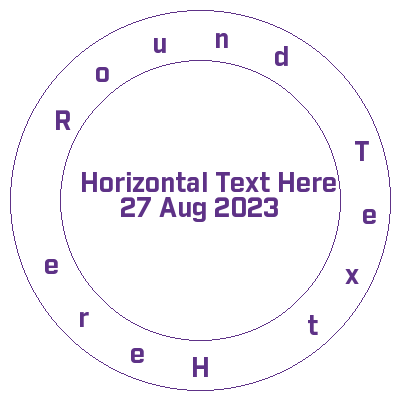
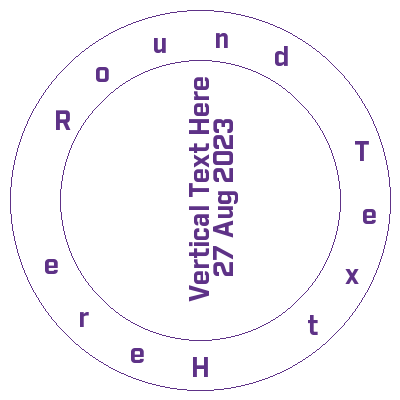
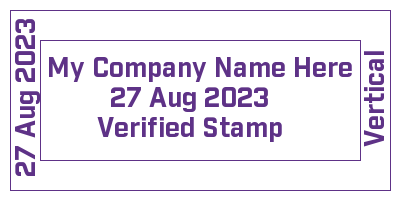
Initialize class
use Peterujah\NanoBlockTech\Stamp\Circle;
use Peterujah\NanoBlockTech\Stamp\Square;
use Peterujah\NanoBlockTech\Stamp\Colors;
use Peterujah\NanoBlockTech\Stamp\Stamp;
To draw a square stamp initialize with a square instance
$shape = new Stamp(new Square(400, 200));
To draw a round stamp initialize with a circle instance
$shape = new Stamp(new Circle(400, 400));
Use your stamp shape container instance
$stamp = $shape->getContainerInstance();
Set your text font path
$stamp->setFont(__DIR__ . '/font/industry-bold.ttf');
Set your background color or use the default transparent background
$stamp->setBackgroundColor(Colors::ALPHA_WHITE);
Drow your border with RGB color array
$stamp->drawBorder(Colors::VIOLET);
For Square Shape Stamp
Adjust the right and top to fit your text
$stamp->drawCenterText("My Company Name Here",[
    "fontSize" => 20,
    "color" => Colors::VIOLET,
    "right" => 125,
    "top" => -30,
]);
$stamp->drawCenterText("27 Aug 2023", [
    "fontSize" => 20,
    "color" => Colors::VIOLET,
    "right" => 80,
    "top" => 30,
]);
$stamp->drawCenterText("Verified Stamp", [
    "fontSize" => 20,
    "color" => Colors::VIOLET,
    "right" => 80,
    "top" => 90,
]);

$stamp->drawRightText("Vertical", [
    "fontSize" => 20,
    "color" => Colors::VIOLET,
    "top" => 110,
    "right" => 55,
]);

$stamp->drawLeftText("27 Aug 2023", [
    "fontSize" => 20,
    "color" => Colors::VIOLET,
    "top" => 170,
    "left" => 230,
]);
For Circle Shape Stamp
Adjust the left and top to fit your text
Drow round text
$stamp->drawRoundText("Round Text Here", 20, Colors::VIOLET, true);
Drow a center text
$stamp->drawCenterText("Horizontal Text Here", [
    "fontSize" => 20,
    "color" => Colors::VIOLET,
    "top" => 200,
    "left" => 60,
]);
$stamp->drawCenterText("27 Aug 2023", [
    "fontSize" => 20,
    "color" => Colors::VIOLET,
    "top" => 250,
    "left" => 60,
]);
To draw a vertical center text only available for circle shape stamp
$stamp->drawVerticalText("Vertical Text Here", [
    "fontSize" => 20,
    "color" => Colors::VIOLET,
    "top" => 220,
    "left" => 10,
]);
$stamp->drawVerticalText("27 Aug 2023", [
    "fontSize" => 20,
    "color" => Colors::VIOLET,
    "top" => 170,
    "left" => 15,
]);
Now save, download or preview generated stamp
Flag D = Download, S = Save, I = Display
$stamp->create('stamp_image.png', "S");
More Methods
To add an image overlay
$stamp->drawCenterImage(__DIR__ . "/company-logo.png", [
    "top" => 0,
    "left" => 0,
    "width" => 50,
    "height" => 50
]);
统计信息
- 总下载量: 30
- 月度下载量: 0
- 日度下载量: 0
- 收藏数: 0
- 点击次数: 6
- 依赖项目数: 0
- 推荐数: 0
其他信息
- 授权协议: MIT
- 更新时间: 2023-08-27