rashiqulrony/payerurl
最新稳定版本:v1.0.2
Composer 安装命令:
composer require rashiqulrony/payerurl
包简介
Payerurl Package for laravel
README 文档
README
A simple Laravel package for Payerurl payment getaway package.
Installation
composer require rashiqulrony/payerurl
Publish config file
You should publish the config file with:
php artisan vendor:publish --provider="Rashiqulrony\Payerurl\Providers\AppServiceProvider" --tag=config
In config/payerurl.php config file you should set payerurl global path.
return [
     /*
    |--------------------------------------------------------------------------
    | API URL
    |--------------------------------------------------------------------------
    |
    |
    */

    'api_url' => "https://api-v2.payerurl.com/api/payment",


    /*
    |--------------------------------------------------------------------------
    | PayerUrl API credentials
    |--------------------------------------------------------------------------
    |
    | PayerUrl API credentials
    | Do not share the credentials
    | Get your API key : https://dash.payerurl.com/profile/get-api-credentials
    |
    |
    */

    'public_key' => env('PAYERURL_PUBLIC_KEY'),
    'secret_key' => env('PAYERURL_SECRET_KEY'),
];
💳 PayerURL Payment Integration – Laravel
This method allows you to integrate with the PayerURL Payment Gateway using a simple PHP function. It's designed for systems where server-to-server communication is preferred over frontend SDKs.
📌 Function: payment($invoiceId, $currency, $data, $orderItems)
Handles the payment process with PayerURL API and redirects the customer to the payment page.
🔑 GET API KEY
Get your API key : https://dash.payerurl.com/profile/get-api-credentials
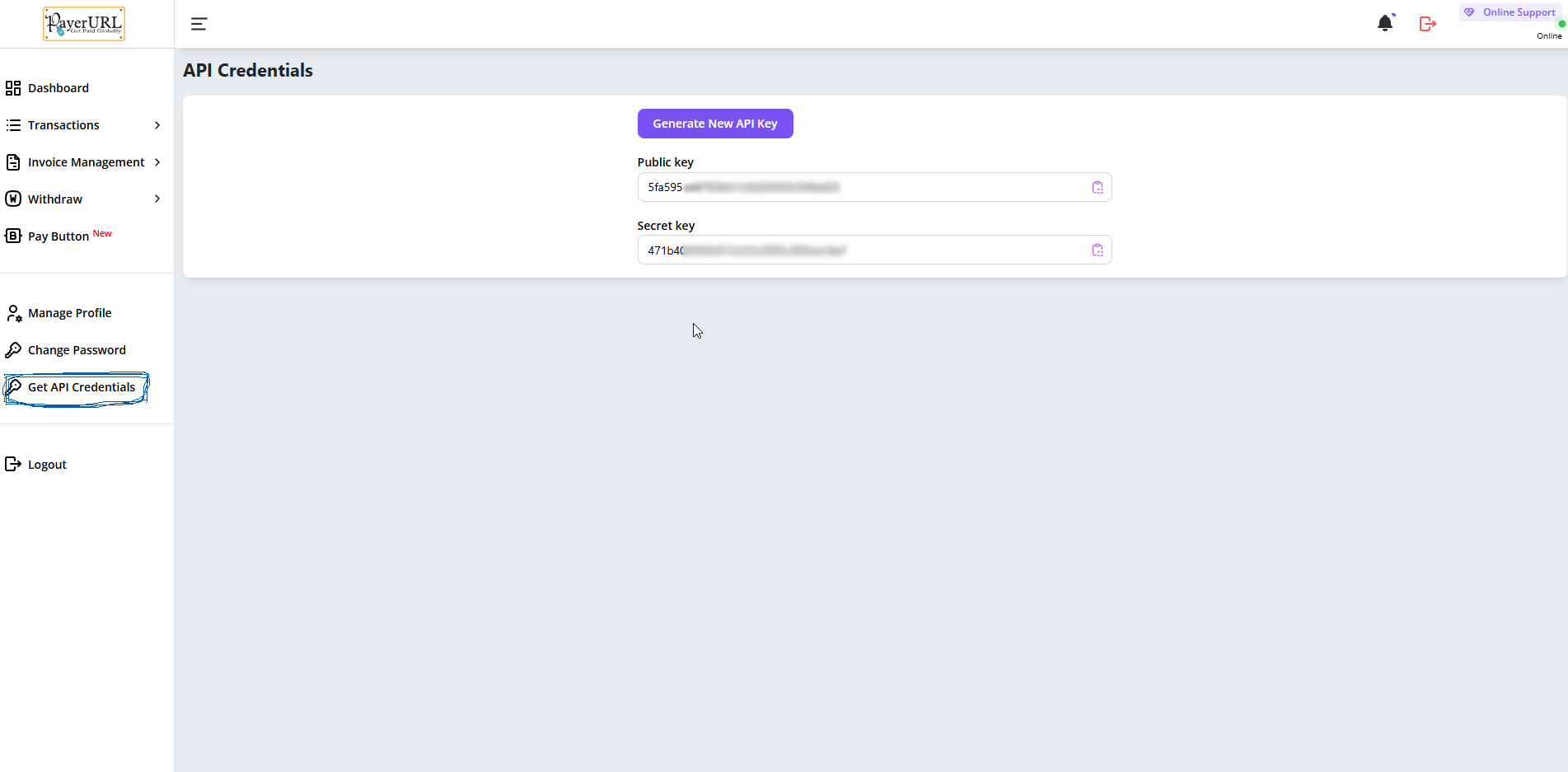
Using .env
PAYERURL_PUBLIC_KEY="Your_public_key"
PAYERURL_SECRET_KEY="Your_secret_key"
✅ Required Parameters
| Name | Type | Required | Description |
|---|---|---|---|
| $invoiceId | string | ✅ | Unique invoice or order ID. |
| $amount | int | ✅ | Payment amount (in smallest currency unit, e.g., cents). |
| $currency | string | ❌ | Currency code (e.g., usd, bdt). Default: usd. |
| $data | array | ✅ | Contains customer info, redirect URLs, and API credentials. |
🔑 $data Array Structure
$data = [
    'first_name'   => 'John',             // Optional
    'last_name'    => 'Doe',              // Optional
    'email'        => 'john@example.com', // Optional
    'redirect_url' => 'https://yourdomain.com/payment-success',
    'notify_url'   => 'https://yourdomain.com/api/payment-notify',
    'cancel_url'   => 'https://yourdomain.com/checkout'
];

// Must be order item is required* and quantity will be minimum 1
$orderItems = [
     [
         'name' => "Order item name",
         'qty' => '2',
         'price' => '100',
     ],
     [
         'name' => "Order item name",
         'qty' => '1',
         'price' => '200',
     ],
]
🚀 How It Works
- Collect user and order info on your platform.
- Call the payment() function with required details.
- User is redirected to PayerURL payment page.
- After payment:
- User is redirected to redirect_url.
- Your backend receives a callback at notify_url with transaction details.
- On cancellation, user is returned to cancel_url.
🧪 Sample Usage
use Rashiqulrony\Payerurl\Payerurl;

$invoiceId = rand(0000000, 9999999); // Must be random Invoice ID
$currency = 'usd';
$data = [
    'first_name' => 'Alice',
    'last_name' => 'Smith',
    'email' => 'alice@example.com',
    'redirect_url' => 'https://yoursite.com/payment-success',
    'notify_url' => 'https://yoursite.com/api/payment-notify',
    'cancel_url' => 'https://yoursite.com/cart'
];

// Must be order item is required* and quantity will be minimum 1
$orderItems = [
     [
         'name' => "Order item name",
         'qty' => '2',
         'price' => '100',
     ],
     [
         'name' => "Order item name",
         'qty' => '1',
         'price' => '200',
     ],
]


$response = Payerurl::payment($invoiceId, $currency, $data, $orderItems);
🧪 Response
Payment success
'status' => true,
'redirectUrl' => "https://dash.payerurl.com/payment/WP112*****", // Payment page URL
Payment Error
'status' => false,
'message' => "Error Message",
✅ Done!
When you push this README.md to your GitHub repository, it will show badges immediately!
No manual update needed — Packagist will auto-refresh version/downloads after you push tags/releases.
Would you also like me to show you how to make automatic GitHub Actions to update your Packagist on every push (extra pro setup)? 🚀
👉 (it’s very easy and professional) — just tell me!
统计信息
- 总下载量: 10
- 月度下载量: 0
- 日度下载量: 0
- 收藏数: 1
- 点击次数: 3
- 依赖项目数: 0
- 推荐数: 0
其他信息
- 授权协议: MIT
- 更新时间: 2025-04-28