sourceability/console-toolbar-bundle
最新稳定版本:0.1.13
Composer 安装命令:
composer require sourceability/console-toolbar-bundle
包简介
This bundle enables displaying the web toolbar in the console/terminal.
README 文档
README
Render the symfony profiler toolbar in your terminal.

Each panel links to the corresponding web profiler page. Make sure to use a terminal that support hyperlinks to leverage this feature.
Installation
Install the bundle using composer:
$ composer require --dev sourceability/console-toolbar-bundle
Enable the bundle by updating config/bundles.php:
return [
    Symfony\Bundle\FrameworkBundle\FrameworkBundle::class => ['all' => true],
    // ...
    FriendsOfBehat\SymfonyExtension\Bundle\FriendsOfBehatSymfonyExtensionBundle::class => ['dev' => true, 'test' => true],
    Sourceability\ConsoleToolbarBundle\SourceabilityConsoleToolbarBundle::class => ['dev' => true, 'test' => true],
];
Configure the bundle in config/packages/{dev,test}/sourceability_console_toolbar.yaml:
sourceability_console_toolbar:
    toolbar:
        hidden_panels:
            - config
            - form
            - validator
            - logger
If your application is not exposed at http://localhost exactly, make sure that
you've configured the router request context for your environment.
By default, the profiler does not always run in the test environment.
You can enable it like this:
--- a/config/packages/test/web_profiler.yaml
+++ b/config/packages/test/web_profiler.yaml
@@ -3,4 +3,4 @@ web_profiler:
     intercept_redirects: false

 framework:
-    profiler: { collect: false }
+    profiler: { enabled:true, collect: true, only_exceptions: false }
Also add web profiler routes in config/routes/test/web_profiler.yaml
web_profiler_wdt:
    resource: '@WebProfilerBundle/Resources/config/routing/wdt.xml'
    prefix: /_wdt

web_profiler_profiler:
    resource: '@WebProfilerBundle/Resources/config/routing/profiler.xml'
    prefix: /_profiler
Behat
This bundle becomes really useful when writing/debugging behat scenarios.
First enable the behat extension by adding the following to your behat configuration:
default:
    extensions:
        FriendsOfBehat\SymfonyExtension: ~
        Sourceability\ConsoleToolbarBundle\Behat\SymfonyToolbarExtension: ~
This will display the console toolbar whenever a new symfony profile is detected:
PHPUnit
Add the following to your phpunit.xml configuration:
    <extensions>
        <extension class="Sourceability\ConsoleToolbarBundle\PHPUnit\ConsoleToolbarExtension">
            <arguments>
                <boolean>false</boolean> <!-- always show, if false use: TOOLBAR=true phpunit ...-->
                <integer>4</integer> <!-- Indentation -->
            </arguments>
        </extension>
    </extensions>
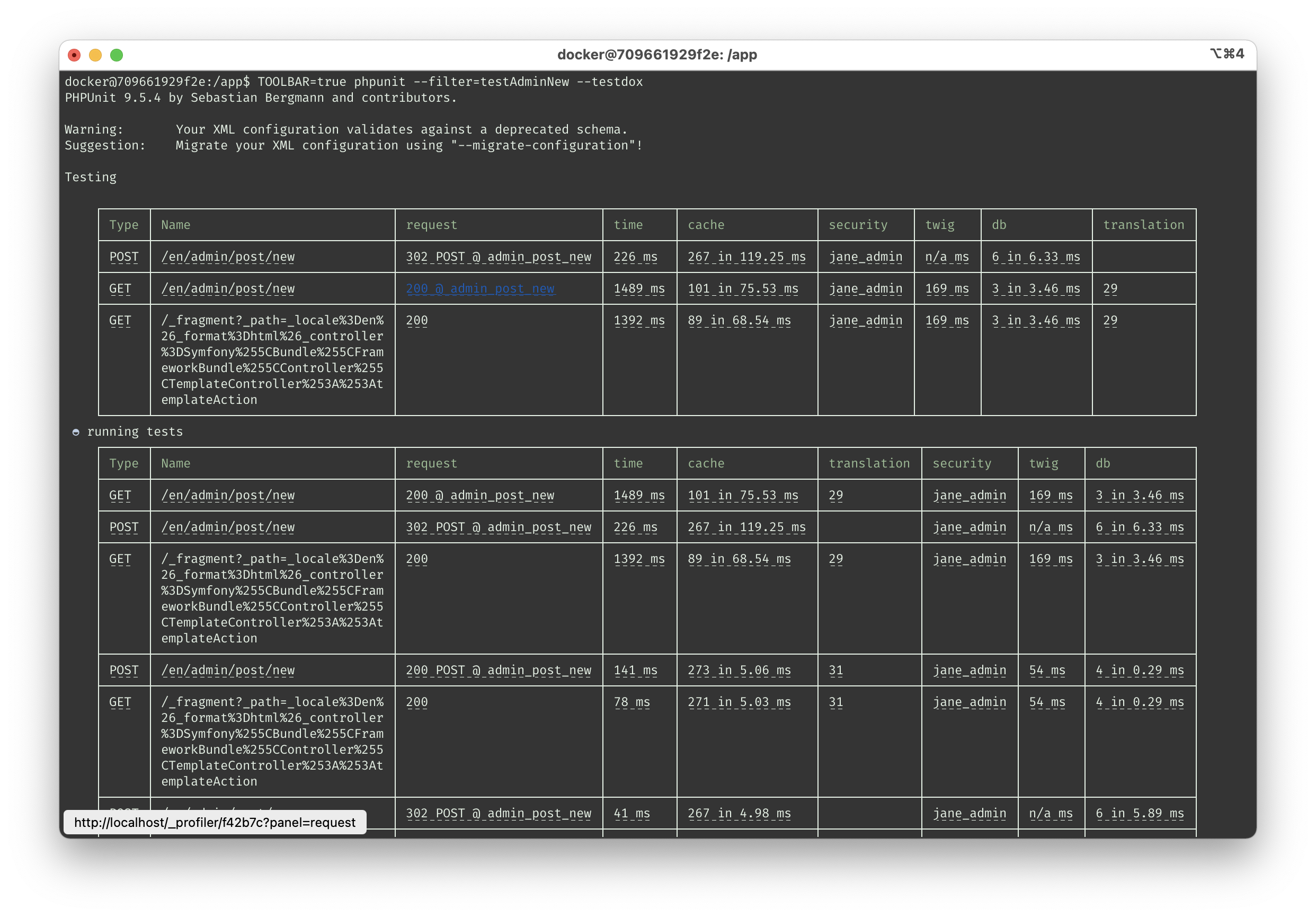
Console
bin/console now has a new global option --toolbar:

This feature requires sourceability/instrumentation with the following bundle configuration:
sourceability_instrumentation:
    profilers:
        symfony:
            enabled: true
    listeners:
        command:
            enabled: true
统计信息
- 总下载量: 411.32k
- 月度下载量: 0
- 日度下载量: 0
- 收藏数: 55
- 点击次数: 8
- 依赖项目数: 0
- 推荐数: 0
其他信息
- 授权协议: MIT
- 更新时间: 未知