trendyminds/molecule
最新稳定版本:1.2.0
Composer 安装命令:
composer require trendyminds/molecule
包简介
Grab Twig components, CSS and JS files outside the primary template folder
README 文档
README

Why Molecule?
Molecule allows you to grab Twig components from outside the template folder. This is useful if you want to keep your Twig partials, CSS, React/Vue files, etc in a single component folder. Now all of your components are nicely organized in individual folder structures!
├── components/
│   ├── ButtonPrimary/
│   │   ├── index.css
│   │   ├── index.jsx
│   │   ├── index.twig
│   │   └── README.md
│   ├── Gallery/
│   ├── Hero/
│   └── VideoEmbed/
└── public/
    ├── cpresources/
    ├── index.php
    └── .htaccess
Example use
Setup your ButtonPrimary/index.twig partial:
<a href="{{url}}"{% if newWindow is defined and newWindow %} target="_blank"{% endif %}>
  {{label}}
</a>
Then include in your Twig templates using the following syntax:
{{craft.molecule.get("ButtonPrimary", {
    url: "https://google.com",
    label: "Visit Google.com",
    newWindow: true
  })
}}
You can even include components in other components!
/components/Hero/index.twig
<div class="Hero">
  <img src="myImage.jpg" alt="A short description">

  {{craft.molecule.get("ButtonPrimary", {
      url: "#",
      label: "Learn more"
    })
  }}
</div>
Icon Components
If you have an Icon/ component there's an additional craft.molecule.icon() helper you can use to output the SVG directly into your templates.
├── components/
│   ├── Icon/
│   │   ├── images/
│   │   │    ├── arrow.svg
│   │   │    ├── play-button.svg
│   │   │    └── twitter.svg
│   │   ├── index.css
│   │   └── index.jsx
│   ├── Gallery/
└── public/
    ├── cpresources/
    ├── index.php
    └── .htaccess
{{craft.molecule.icon("twitter", { class: "custom_class" })}}
will compile to:
<span class="Icon Icon--twitter custom_class">
  <!-- SVG contents of twitter.svg -->
</span>
Testimonials
Matt Rothenberg @mattrothenberg
@aaronbushnell @CraftCMS I went all in 😜.
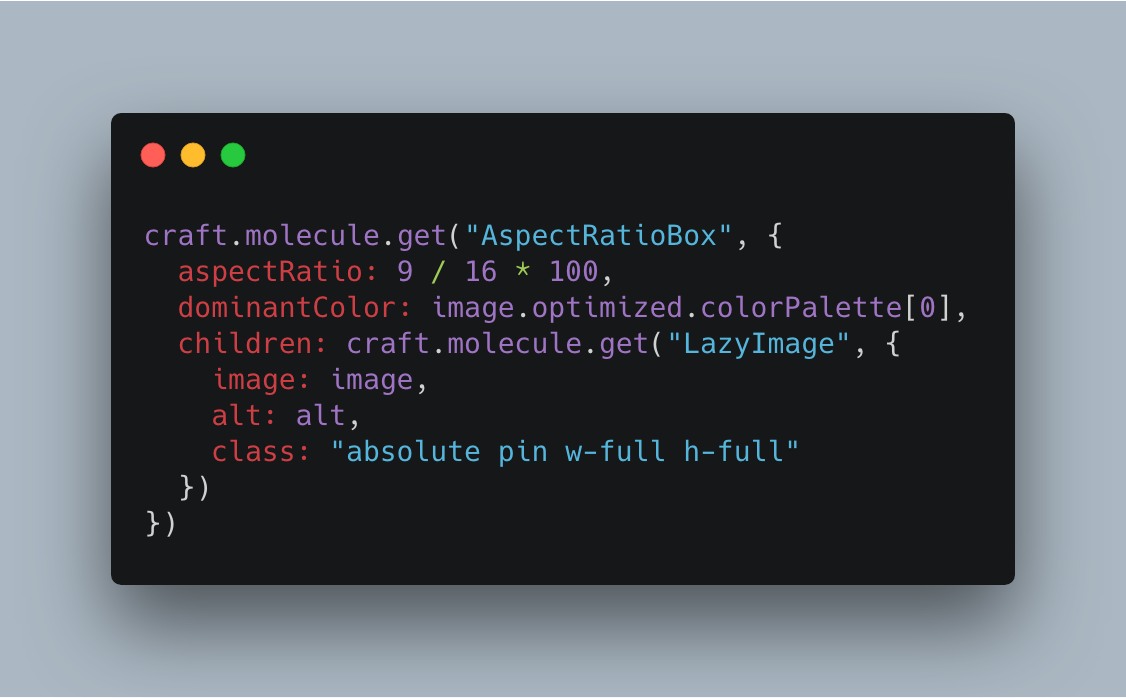
Feels so nice to be able to "compose" components in a React-y way, too. https://twitter.com/mattrothenberg/status/1094693570177654784/photo/1

Requirements
This plugin requires Craft CMS 3.0.0-beta.23 or later.
Installation
To install the plugin, follow these instructions.
-
Open your terminal and go to your Craft project:
cd /path/to/project -
Then tell Composer to load the plugin:
composer require trendyminds/molecule -
In the Control Panel, go to Settings → Plugins and click the “Install” button for Molecule.
-
Configure the path to your components directory within Molecule's settings
Credits
Icon by Aaron Humphreys — Dribbble post
统计信息
- 总下载量: 10.68k
- 月度下载量: 0
- 日度下载量: 0
- 收藏数: 20
- 点击次数: 0
- 依赖项目数: 0
- 推荐数: 0
其他信息
- 授权协议: MIT
- 更新时间: 2018-10-10