xp-forge/terminal
最新稳定版本:v1.0.1
Composer 安装命令:
composer require xp-forge/terminal
包简介
Terminal control
README 文档
README


The terminal library adds support for color to the util.cmd.Console class.
Styles
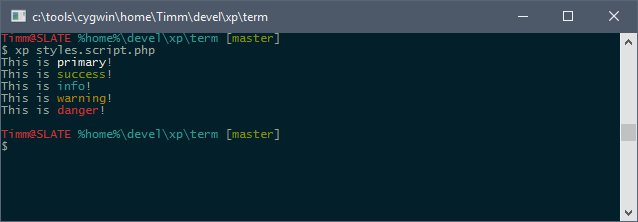
There are five predefined styles:
use util\cmd\Console;

Console::writeLine('This is <primary>primary</>!');
Console::writeLine('This is <success>success</>!');
Console::writeLine('This is <info>info</>!');
Console::writeLine('This is <warning>warning</>!');
Console::writeLine('This is <danger>danger</>!');
Colors
For direct color control, the colors can be chosen directly by supplying their names. Foreground and background colors are separated by the @ sign:
use util\cmd\Console;

Console::writeLine('<red>An error occured</>');
Console::writeLine('<white@green>OK: 100 Tests succeeded</>');
The colors' names are black, dark-red, dark-green, dark-yellow, dark-blue, dark-magenta, dark-cyan, gray, dark-gray, red, green, yellow, blue, magenta, cyan and white.
Attributes
There are three more attributes. Not all terminals support these, though!
use util\cmd\Console;

Console::writeLine('<underline>http://localhost</>');
Console::writeLine('<bold>Watch out!</>');
Console::writeLine('<italic>- The XP Framework group</>');

// Can be combined, too
Console::writeLine('<dark-blue,underline>http://localhost</>');
Positioning
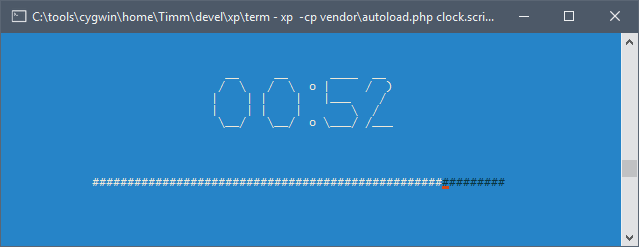
The util.cmd.term.Terminal class allows clearing the screen, positioning the cursor and writing text there.
use util\cmd\term\Terminal;

$message= 'Hello from the middle of the screen';

// Center text in third line
$dim= Terminal::size();
$x= ($dim[0] - strlen($message)) / 2;
$y= 3;

Terminal::clear();
Terminal::write($x, $y, $message);
For the more advanced example seen above in the screenshot, have a look at this code.
统计信息
- 总下载量: 3.65k
- 月度下载量: 0
- 日度下载量: 0
- 收藏数: 0
- 点击次数: 5
- 依赖项目数: 0
- 推荐数: 0
其他信息
- 授权协议: BSD-3-Clause
- 更新时间: 2016-06-19