zereflab/laravel-bug-reports
Composer 安装命令:
composer require zereflab/laravel-bug-reports
包简介
Organized Laravel exception reports for Slack, with threaded stack traces, duplicate throttling, and interactive solve/ignore actions.
README 文档
README
Organized Laravel exception reports for Slack.
This package replaces noisy default Slack log messages with a clean parent alert, a full threaded exception, duplicate throttling, and Slack buttons for Solved / Ignore.
Features
- Laravel log channel integration
- Short parent Slack message with useful context
- Full exception and stack trace in the Slack thread
- Duplicate throttling by exception fingerprint
SolvedandIgnoreSlack buttons- One click updates every stored Slack message for the same error fingerprint
- Ignored fingerprints suppress future alerts
- Safe production behavior: Slack failures do not break your app
- Test command that fails loudly when Slack config is wrong
- Designed for future Discord support
Getting Started
1. Install the package
composer require zereflab/laravel-bug-reports
2. Publish the config
php artisan vendor:publish --tag=bug-reports-config
3. Run the migrations
php artisan migrate
4. Connect Slack
Install the pre-built LaravelBugBot Slack app into your workspace — no Slack app creation needed:
https://laravelbugbot.com/integrations/slack/install
After installation, the success page shows a managed bot token. Paste the generated values into your .env:
LOG_CHANNEL=bug_reports
LOG_LEVEL=error

BUG_REPORTS_SLACK_APP_MODE=managed
BUG_REPORTS_SLACK_BOT_TOKEN=xoxb-generated-token
BUG_REPORTS_SLACK_CHANNEL="<put your channel id where you add the bot>"
BUG_REPORTS_SLACK_ACTIONS_ENABLED=true
5. Add Laravel Bug Bot to your Slack channel
Slack requires you to add the installed app to the channel before it can post alerts there.
-
Click the channel name at the top of your Slack channel.
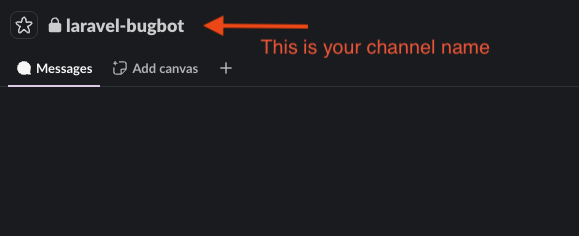
-
Open the Integrations tab in the channel details modal.
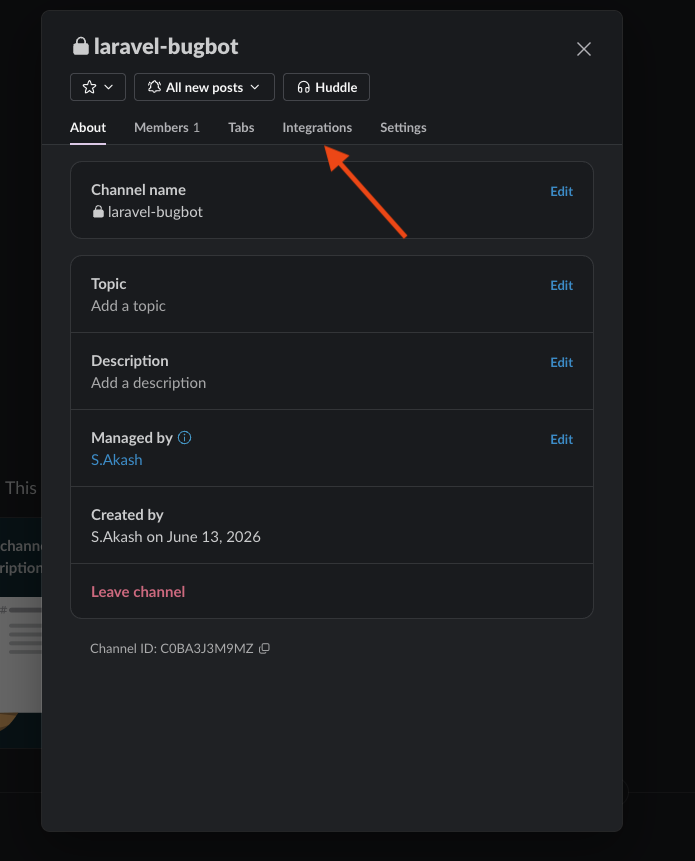
-
In the Apps section, click Add an App.
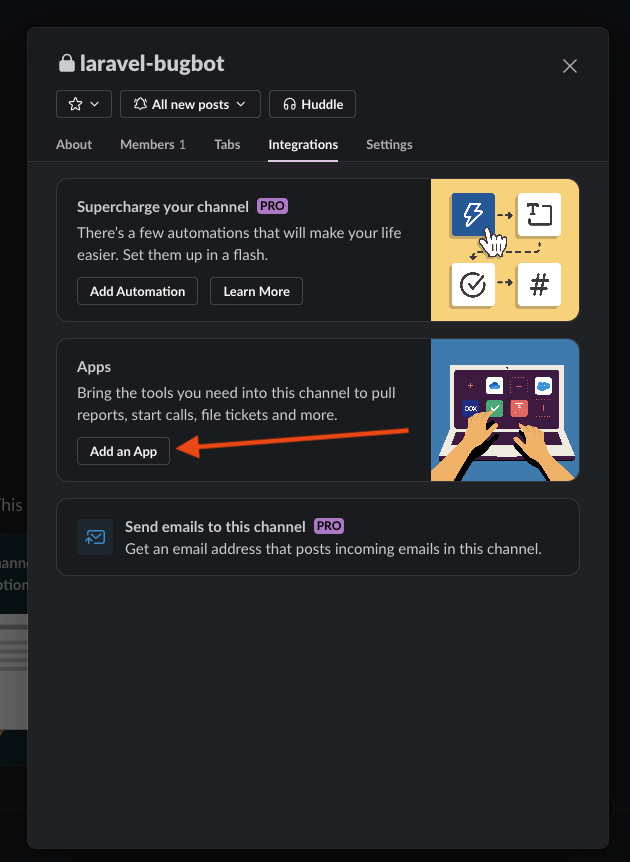
-
Find Laravel Bug Bot and click Add.
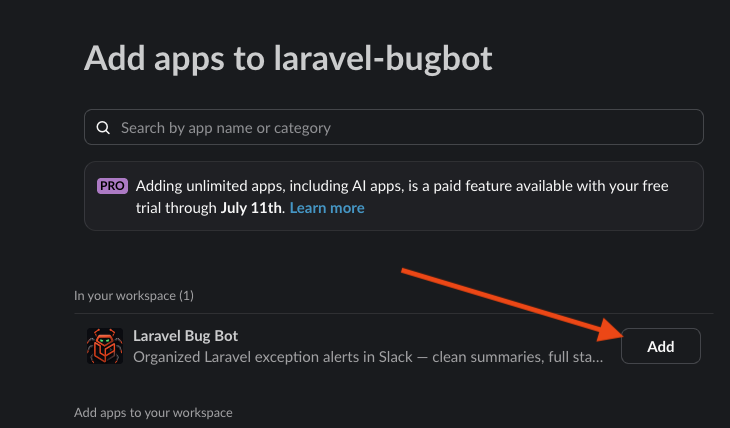


6. Copy the Slack channel ID
Copy the Channel ID from Slack, then replace the placeholder in BUG_REPORTS_SLACK_CHANNEL.

The channel value is the channel ID, not the channel name.
7. Test your setup
php artisan bug-reports:test
You should see the test exception arrive in your Slack channel. That's it — every exception in your app now lands in Slack, organized.
8. Authorize dashboard access
The dashboard is available in your application at:
https://yourdomain.com/bugs-report
Edit app/Providers/AppServiceProvider.php and add the dashboard gate inside the boot() function:
use App\Models\User;
use Illuminate\Support\Facades\Gate;

public function boot(): void
{
    Gate::define('viewBugReports', function (User $user) {
        return $user->is_admin;
    });
}
Optionally, allow specific users by database ID:
BUG_REPORTS_DASHBOARD_USER_IDS=205,206
Want To Use Your Own Slack Application?
If you prefer to create and control your own Slack app (required for the Slack Solved / Ignore buttons), follow the separate guide:
Environment Variables
Defaults shown below — override only what you need:
BUG_REPORTS_REPORTER=slack
BUG_REPORTS_LOG_CHANNEL=bug_reports
BUG_REPORTS_CACHE_PREFIX=bug-reports
BUG_REPORTS_SLACK_APP_MODE=own
BUG_REPORTS_SLACK_INSTALL_URL=https://laravelbugbot.com/integrations/slack/install
BUG_REPORTS_SLACK_USERNAME="${APP_NAME}"
BUG_REPORTS_SLACK_EMOJI=:boom:
BUG_REPORTS_SLACK_ACTIONS_ENABLED=true
BUG_REPORTS_SLACK_IGNORE_TTL_DAYS=0
BUG_REPORTS_SLACK_SOLVED_TTL_DAYS=7
BUG_REPORTS_SLACK_STORED_MESSAGES=50
BUG_REPORTS_ROUTE_PREFIX=bug-reports
BUG_REPORTS_ROUTE_MIDDLEWARE=api
BUG_REPORTS_DASHBOARD_PATH=bugs-report
BUG_REPORTS_DASHBOARD_MIDDLEWARE=web,auth
BUG_REPORTS_DASHBOARD_GATE=viewBugReports
BUG_REPORTS_DASHBOARD_USER_IDS=
After changing config:
php artisan config:clear
php artisan config:cache
What The Slack Alert Looks Like
Parent message:
- Date/time
- Log level
- Exception class
- Exact exception message
- Origin: command, job, controller, route action, or application class
- Entity/user/model information when detectable
- File and line
SolvedandIgnorebuttons
Thread reply:
- Exception class
- Message
- Location
- Level
- Environment
- Request details when available
- Context
- Stack trace
- Previous exception when available
Solved And Ignore
Each exception gets a fingerprint based on exception class, message, file, and line.
Ignoresuppresses future alerts for that same fingerprint.Solvedmarks the fingerprint as resolved and clears the throttle.- Both actions update all stored parent messages for that same fingerprint.
- If a solved fingerprint happens again, it is reopened as pending.
Bug reports, occurrence counts, statuses, and Slack message references are stored in the database. By default, ignored errors are ignored forever. You can expire ignored errors:
BUG_REPORTS_SLACK_IGNORE_TTL_DAYS=30
Dashboard
The package includes a built-in dashboard:
https://your-domain.com/bugs-report
The dashboard shows:
- Total error fingerprints and total occurrences
- Errors received in the last 1, 5, 7, 10, and 30 days
- Pending, resolved, and ignored counts
- Noisiest origins and exception classes
- Paginated tables for all, pending, resolved, and ignored errors
- Resolve, ignore, and delete actions
Change the dashboard path:
BUG_REPORTS_DASHBOARD_PATH=internal/bugs
Dashboard authorization
The dashboard denies everyone by default. To grant access, edit app/Providers/AppServiceProvider.php and add the gate inside the boot() function:
use App\Models\User;
use Illuminate\Support\Facades\Gate;

public function boot(): void
{
    Gate::define('viewBugReports', function (User $user) {
        return $user->is_admin;
    });
}
Or allow specific user IDs without defining a gate:
BUG_REPORTS_DASHBOARD_USER_IDS=1,42
Add authentication middleware so visitors are sent to login first:
BUG_REPORTS_DASHBOARD_MIDDLEWARE=web,auth
Production Notes
Use this in production:
APP_DEBUG=false
LOG_CHANNEL=bug_reports
BUG_REPORTS_LEVEL=error
BUG_REPORTS_THROTTLE_MINUTES=5
Do not use Laravel's default slack channel if you want this package's formatting. Use bug_reports.
Future Discord Support
The package is structured around reporter drivers. Slack is the first reporter. Discord can be added later with the same fingerprinting, summary formatting, threaded/detail behavior where supported, and solved/ignore state.
License
MIT
统计信息
- 总下载量: 0
- 月度下载量: 0
- 日度下载量: 0
- 收藏数: 0
- 点击次数: 8
- 依赖项目数: 0
- 推荐数: 0
其他信息
- 授权协议: MIT
- 更新时间: 2026-06-12